No products in the cart.

Only this weekend
Super Discount
Items on sale this week
Top picks this week. Up to 50% off the best selling products.
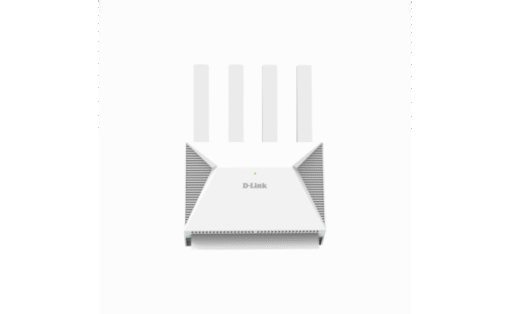
Price (Inc. Tax): KSh13,920
Next‑Gen Wi‑Fi 7 Performance with Dual-Band Mesh, Multi‑Gig Ports & Easy Setup
The DIR‑BE364K, branded BE3600, is D‑Link’s entry into Wi‑Fi 7 with dual-band coverage (2.4 GHz + 5 GHz) and mesh compatibility. It targets users needing ultra-fast wireless for streaming, gaming, smart homes, and future-proofing, while keeping deployment straightforward. With 2.5 Gbps WAN + LAN, 4× external antennas, and quad-core CPU, it appeals to tech-savvy home and small-office setups.
DIR‑BE364K Delivers up to 3.6 Gbps combined (2.4 GHz + 5 GHz) using EHT, 4K QAM, OFDMA, and MU-MIMO .
DIR‑BE364K Excellent for 4K/8K streaming, gaming, VR/AR, smart devices, and fast downloads .
1× 2.5 Gbps WAN port and 1× 2.5 Gbps LAN port for next-gen broadband and LAN speed .
Plus 3× 1 Gbps LAN ports offer link aggregation.
Supports D‑Link Wi‑Fi Mesh (EasyMesh) for seamless network expansion .
Quad-core 1.1 GHz CPU, 512 MB RAM, 128 MB Flash, external antennas .
Supports WPA3 encryption, parental controls, guest networks, firewall, VPN passthrough, and QoS .
Use the D‑Link Connect App for guided setup, monitoring, parental controls, and firmware updates .
DIR‑BE364K Users emphasize it’s Wi‑Fi 7 without 6 GHz. That means it lacks the uncrowded 6 GHz channel, which may affect future performance .
Some report interoperability issues mixing BE3600 with other mesh systems; best results come from using BE3600 units in the same system .
Reports of jitter in gaming setups—mostly when not optimized. Wired clients remained stable .
DIR‑BE364K Users praise the 2.5 GbE ports and processing power for high-speed connections, even when Wi‑Fi alone doesn’t fully leverage them .
Next-gen Wi‑Fi 7 speed on dual bands
2.5 Gbps WAN & LAN—future-proof for gigabit+ ISPs
Supports mesh networking
Robust security and QoS features
Easy app-based setup
No 6 GHz band limits Wi‑Fi 7 full potential
Dual-band only means backhaul shares bandwidth
Mixed mesh setups with non-BE3600 nodes may have glitches
Some users report latency issues in gaming setups
| Feature | Details |
|---|---|
| Wi‑Fi Standard | 802.11be (Wi‑Fi 7), Dual‑Band (2.4 + 5 GHz) |
| Max Speed | 3.6 Gbps combined EHT |
| ANTENNAS | 4 external (2× 2.4 GHz & 2× 5 GHz) |
| Ports | 1× 2.5 Gbps WAN; 1× 2.5 Gbps LAN; 3× 1 Gbps LAN |
| CPU / RAM / Flash | Quad-core 1.1 GHz / 512 MB DDR3 / 128 MB Flash |
| Security | WPA3, firewall, guest network, parental controls |
| Other Features | MU‑MIMO, OFDMA, EHT, QoS, VPN passthrough |
| Mesh Support | D-Link Wi‑Fi Mesh (EasyMesh) |
| Ports on Device | 1× Reset, 1× WPS |
| Power Supply | 12 V/1.5 A |
| Dimensions | ~225 × 147 × 46 mm (est.) |
| Warranty | Typically 1 yr warranty |
With gigabit internet and multi-gig wired clients, BE3600 provides significant speed for gaming, streaming, and file transfers.
DIR‑BE364K Deploy multiple BE3600 routers for unified coverage—monitor roaming, parental controls, and QoS via the app.
Handles dozens of devices (IoT, security cams, phones) with ease using OFDMA and MU-MIMO for efficiency.
DIR‑BE364K Set it as main or secondary router for guest/wifi network, using firewall, VLAN, parental controls, and VPN passthrough.
Use BE3600 units only for clean mesh; mixing brands can cause roaming issues .
Enable QoS for gaming or streaming to manage bandwidth.
Use wired backhaul where possible since there’s no 6 GHz dedicated link.
Keep firmware up-to-date—use the app.
Change admin password, disable remote access, and set guest network per security best practices .
The D‑Link BE3600 (DIR‑BE364K) is a strong choice for those wanting early Wi‑Fi 7 benefits and multi-gig Ethernet, without the cost or complexity of tri-band systems. It offers impressive throughput and a powerful feature set for modern households and home offices. Just be aware it’s dual‑band only and mixes best in a full D‑Link mesh setup.
🔗 [Explore on Radox Technology Limited – DIR‑BE364K BE3600 Mesh Router]
| Feature | Details |
|---|---|
| Wi‑Fi Standard | 802.11be (Wi‑Fi 7), Dual‑Band (2.4 + 5 GHz) |
| Max Speed | 3.6 Gbps combined EHT |
| ANTENNAS | 4 external (2× 2.4 GHz & 2× 5 GHz) |
| Ports | 1× 2.5 Gbps WAN; 1× 2.5 Gbps LAN; 3× 1 Gbps LAN |
| CPU / RAM / Flash | Quad-core 1.1 GHz / 512 MB DDR3 / 128 MB Flash |
| Security | WPA3, firewall, guest network, parental controls |
| Other Features | MU‑MIMO, OFDMA, EHT, QoS, VPN passthrough |
| Mesh Support | D-Link Wi‑Fi Mesh (EasyMesh) |
| Ports on Device | 1× Reset, 1× WPS |
| Power Supply | 12 V/1.5 A |
| Dimensions | ~225 × 147 × 46 mm (est.) |
| Warranty | Typically 1 yr warranty |


Reviews
There are no reviews yet.