No products in the cart.

Only this weekend
Super Discount
Items on sale this week
Top picks this week. Up to 50% off the best selling products.


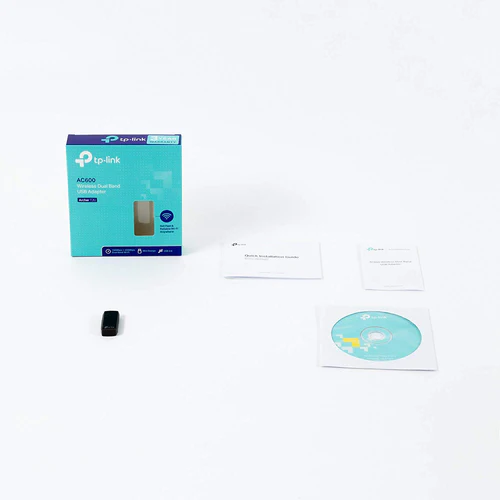


Price (Inc. Tax): KSh4,640
Frequency Bands: 2.4GHz and 5GHz
Signal Rate: 5GHz (11ac): Up to 433Mbps
In today’s digital world, where fast and stable internet connectivity is essential for everything from work and study to streaming and online gaming, a reliable Wi-Fi connection is more important than ever. The TP-Link Archer T2U AC600 Wireless Dual Band USB Adapter offers a practical and affordable solution to users seeking to upgrade their computer’s wireless capability without replacing their entire system.
Whether you’re using a desktop that lacks built-in Wi-Fi or a laptop with outdated connectivity standards, the TP-Link Archer T2U AC600 Wireless Dual Band USB Adapter brings your system up to speed by leveraging the latest 802.11ac wireless technology. Small, powerful, and easy to install, it’s ideal for anyone looking for performance, portability, and peace of mind.
Wireless Standards: IEEE 802.11ac/a/n/g/b
Frequency Bands: Dual-band (2.4GHz & 5GHz)
Speed:
5GHz: Up to 433Mbps
2.4GHz: Up to 150Mbps
Interface: USB 2.0
Antenna Type: Internal Omni-directional
LED Indicator: Activity status
Security: WEP, WPA, WPA2, WPA-PSK/WPA2-PSK
Dimensions: 41mm x 19.5mm x 8.7mm
Operating Systems: Windows XP/7/8/8.1/10 (32/64-bit), macOS 10.9–10.13
Operating Temperature: 0°C to 40°C
Storage Temperature: -40°C to 70°C
Humidity (Operating/Storage): 10–90% / 5–90% (non-condensing)
The TP-Link Archer T2U AC600 Wireless Dual Band USB Adapter is designed with performance in mind. Its dual-band functionality allows it to operate on two separate frequency bands: 2.4GHz and 5GHz. These bands serve different purposes:
2.4GHz (150Mbps): Offers wider coverage but at slower speeds. This band is perfect for browsing, emailing, and standard video streaming. It’s ideal in environments where long-range signal is required but ultra-high speeds aren’t critical.
5GHz (433Mbps): Offers significantly faster data rates and is less congested than 2.4GHz, making it ideal for online gaming, HD video streaming, and large file transfers. If you’re gaming or using a video conferencing app, this is the preferred band.
By switching between these two frequencies depending on demand and signal quality, the Archer T2U ensures the most stable and efficient connection possible in its category.
The TP-Link Archer T2U AC600 Wireless Dual Band USB Adapter is extremely user-friendly. It uses a USB 2.0 interface that makes installation effortless — just plug the device into an available USB port, install the provided driver (or download the latest version from TP-Link’s official site), and you’re good to go.
Its miniature, low-profile design ensures that the adapter doesn’t protrude awkwardly or interfere with adjacent ports. You can even leave it plugged in when storing your laptop in a bag — a convenient feature for students or professionals on the move.
Security is a key feature of the TP-Link Archer T2U AC600 Wireless Dual Band USB Adapter. It supports the latest Wi-Fi encryption standards:
64/128-bit WEP: A legacy protocol used on older routers
WPA/WPA2: More robust and common in modern networks
WPA-PSK/WPA2-PSK: Offers enhanced protection with simplified configuration, making it perfect for home users
These encryption standards help protect your data from eavesdropping, unauthorized access, and various other cybersecurity threats. Whether you’re working from home or connecting to public Wi-Fi, you can rest easy knowing your connection is encrypted and secure.
The TP-Link Archer T2U AC600 Wireless Dual Band USB Adapter is compatible with a wide range of systems, including:
Windows XP / 7 / 8 / 8.1 / 10 (both 32-bit and 64-bit architectures)
macOS versions from 10.9 to 10.13
While the adapter supports a solid range of operating systems, note that newer versions of macOS (10.14 and later) may not support it without additional driver updates or configuration steps. Be sure to check compatibility if you’re running macOS Monterey or later.
Scenario 1: Laptop with Weak Internal Wi-Fi
Many older laptops still operate on the 802.11n standard, which limits speed and can result in dropped connections. By plugging in the TP-Link Archer T2U AC600 Wireless Dual Band USB Adapter, users can immediately experience a faster, more reliable signal — particularly on the 5GHz band.
Scenario 2: Desktop Without Wireless Capabilities
Many desktop computers, especially budget or older models, don’t include Wi-Fi at all. The TP-Link Archer T2U AC600 Wireless Dual Band USB Adapter provides a cost-effective and straightforward way to connect these systems to modern wireless networks.
Scenario 3: Portable Business Solution
For professionals who travel and often rely on hotel or conference Wi-Fi, the TP-Link Archer T2U AC600 Wireless Dual Band USB Adapter makes sure you can always connect — even if your main device doesn’t have the best built-in Wi-Fi support.
Pros:
Excellent price-to-performance ratio
Dual-band speeds for flexibility
Compact design suited for laptops
Reliable brand with proven hardware support
Easy plug-and-play installation
Cons:
USB 2.0 interface could bottleneck performance in rare high-demand cases
No external antenna; may limit range in signal-challenged areas
Limited macOS support (not ideal for latest MacBook models)
You can find the TP-Link Archer T2U at several reputable retailers, both locally and online. For Kenyan buyers, a trusted source is:
🔗 Radox Technologies Kenya – www.radox.co.ke**
For global buyers, you can refer to the official product page on TP-Link’s website:
🌐 TP-Link Archer T2U Product Page
The TP-Link Archer T2U AC600 Wireless Dual Band USB Adapter is a well-rounded, dependable choice for upgrading your computer’s connectivity. It delivers excellent value for money with reliable performance, strong security, and a discreet design. Whether you’re replacing an outdated wireless card, adding Wi-Fi to a wired system, or simply looking for better network speeds, the T2U will deliver what you need without breaking your budget.
For students, remote workers, gamers, and casual users alike, this small device can make a big difference. It may not be the most high-end option on the market, but it strikes an impressive balance between cost, portability, and real-world performance — which is exactly what most users need.
Wireless Standards: IEEE 802.11ac, IEEE 802.11a, IEEE 802.11n, IEEE 802.11g, IEEE 802.11b
Frequency Bands: 2.4GHz and 5GHz
Signal Rate:
5GHz (11ac): Up to 433Mbps
2.4GHz (11n): Up to 150Mbps
Interface: USB 2.0
Antenna Type: Omni-directional
LED Indicator: Status
Dimensions: 41mm x 19.5mm x 8.7mm
Operating System Support: Windows 10/8.1/8/7/XP (32/64 bits), Mac OS 10.9~10.13
Security: Supports 64/128-bit WEP, WPA-PSK/WPA2-PSK encryption standards
Operating Temperature: 0℃~40℃
Storage Temperature: -40℃~70℃
Operating Humidity: 10%~90% non-condensing
Storage Humidity: 5%~90% non-condensing



Reviews
There are no reviews yet.