No products in the cart.

Only this weekend
Super Discount
Items on sale this week
Top picks this week. Up to 50% off the best selling products.
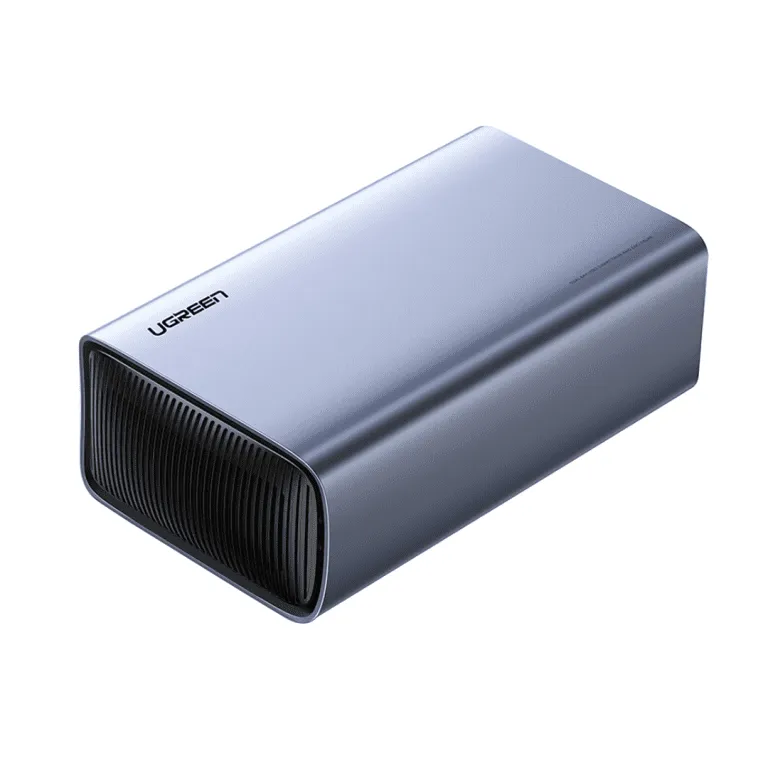

Price (Inc. Tax): KSh10,440
Model: UGREEN CM381
Drive Bays: 2 × 2.5-inch SATA HDD/SSD (some variants support 3.5-inch in certain listings)
RAID Modes: RAID 0 (striping), RAID 1 (mirroring), JBOD / Normal / “Joint / Combination
In this age of rapidly growing data — high-resolution photos and videos, large 4K/8K files, backups, gaming libraries, and multiple devices — storage solutions that are fast, flexible, and reliable are more essential than ever. The UGREEN 2.5″ SATA Dual Bay RAID Hard Drive Enclosure – CM381 is designed to meet those demands. It is much more than a simple external hard drive dock: it’s a dual-bay RAID enclosure offering multiple modes, excellent transfer speeds, durable build, and versatile usage. Whether you’re a creative professional, content creator, IT technician, small business owner, or simply a tech enthusiast, this UGREEN 2.5″ SATA Dual Bay RAID Hard Drive Enclosure – CM381 lets you manage your data with efficiency, security, and convenience.
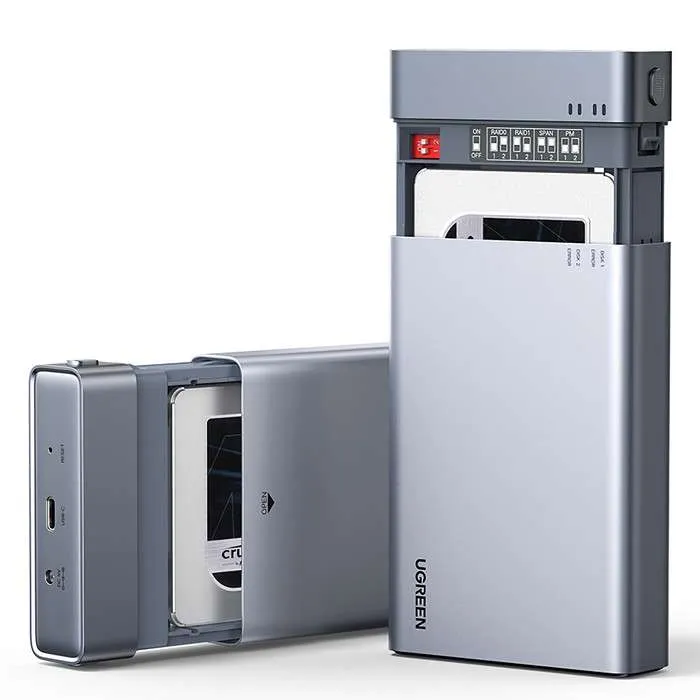
The UGREEN 2.5″ SATA Dual Bay RAID Hard Drive Enclosure – CM381 gives you the ability to house two separate 2.5-inch SATA drives or SSDs in a single enclosure. Instead of plugging in one external drive at a time, you can combine drives in the UGREEN 2.5″ SATA Dual Bay RAID Hard Drive Enclosure – CM381 for different RAID configurations depending on what your priorities are: speed, redundancy, or capacity. For instance, for the UGREEN 2.5″ SATA Dual Bay RAID Hard Drive Enclosure – CM381, in RAID, you combine two drives to achieve faster read/write performance—ideal when you’re editing video or transferring large files. In RAID 1, you mirror one drive onto the other, giving you redundancy: if one drive fails, your data is still safe. Other modes (like JBOD or normal mode) give you flexibility to treat drives independently or combine storage without mirroring or striping.
One major performance advantage of the UGREEN 2.5″ SATA Dual Bay RAID Hard Drive Enclosure – CM381 lies in its USB interface, enabling high data transfer speeds (USB 3.1 / USB 3.0 depending on region), which in many market listings delivers up to 5 Gbps. This means large files move quickly; backups run faster; you can stream data from the drives without noticeable lag. The enclosure supports tool-free installation. Drives can be inserted/removed without needing screws or special tools, which saves time and makes swapping drives easy (e.g, if you carry two small drives and swap usage depending on your project).
In the UGREEN 2.5″ SATA Dual Bay RAID Hard Drive Enclosure – CM381, the enclosure’s build also emphasizes cooling, durability, and quiet operation. Many units for the UGREEN 2.5″ SATA Dual Bay RAID Hard Drive Enclosure – CM381 are housed in aluminum alloy shell (often mixed with ABS/PC plastics in some areas) for better heat dissipation, which prevents performance throttling under heavy file transfers. Some versions are fanless, relying on passive cooling via aluminum to reduce heat, noise, and moving parts that could fail. Other models for the UGREEN 2.5″ SATA Dual Bay RAID Hard Drive Enclosure – CM381 may include small fans depending on the region. LED indicators are provided to show power status, activity (when drives are reading/writing), and sometimes RAID mode status or warnings. These help you monitor what’s going on without needing to open up software panels.
Compatibility is also broad: The UGREEN 2.5″ SATA Dual Bay RAID Hard Drive Enclosure – CM381 works with Windows, macOS, Linux, and often other systems, possibly even mobile devices that support USB host mode. Since it’s a USB enclosure, you just plug in the USB cable (often USB-C or Type-C or USB 3.x) into your computer or host device, and the drives are recognized. No external drivers are typically needed (plug-and-play), though RAID mode switching sometimes requires the hardware button or software, depending on its version.
In real world usage, the UGREEN 2.5″ SATA Dual Bay RAID Hard Drive Enclosure – CM381 becomes especially valuable when you need to manage multiple data workflows or archives. A photographer could put two SSDs into it—one for active current project work, the other for archive backup—and switch RAID modes. A small video production setup could use it as an editing scratch drive. Developers might use it to store virtual machines or code; gamers could put large game libraries into dual drives; home media servers or NAS replacements (for simple cases) could use these drives to store video/movies and media content. Even IT admins can benefit: for system imaging, backups, duplicating drives, or diagnosing drive failures.
Another notable aspect is power for the UGREEN 2.5″ SATA Dual Bay RAID Hard Drive Enclosure – CM381: since it deals with two drives, the enclosure needs stable power and often ships with a power adapter (especially when using 3.5-inch drives or high capacity SSDs that draw more current) — though the UGREEN 2.5″ SATA Dual Bay RAID Hard Drive Enclosure – CM381 is designed for 2.5-inch drives which draw less power. Some variants are bus-powered via USB alone when using low-power SSDs. But when under heavy use or with older HDDs, external power improves stability.
Because of dual bays and RAID capability, you also get data safety options. RAID-1 gives you mirroring; RAID-0 gives speed; JBOD gives maximum usable space without mirroring; and normal mode lets drives act individually. Depending on how you value speed vs safety vs capacity, you can choose your mode.
Additionally, for the UGREEN 2.5″ SATA Dual Bay RAID Hard Drive Enclosure – CM381, because of its thoughtful design, this enclosure is also user-friendly. The drive trays are often drawer or slide-in type, with easy locking; the enclosure body is built so that temperature stays manageable even under continuous I/O, reducing the risk of damage to sensitive flash memory or magnetic platters. For professionals who move drives often, the rugged build, tool-free tray removal, and compatible ports make life much easier.
In summary, the UGREEN 2.5″ SATA Dual Bay RAID Hard Drive Enclosure – CM381 offers a rounded storage solution:
It eliminates the need to buy separate external drives when you already have SATA drives or SSDs.
It improves efficiency (speed, transfers, backup) via RAID modes.
It gives you flexibility (swap drives, choose modes).
It makes your storage system more robust (redundancy if needed).
It’s portable and manageable for power, cooling, and form factor.
If you’re someone who works with large data — video editing, photography, backups, archives — or you want safety for your data plus good speed, the UGREEN 2.5″ SATA Dual Bay RAID Hard Drive Enclosure – CM381 is a strong option. Even for general users, its ability to repurpose old SATA drives into external storage makes it cost-efficient.
Model: UGREEN CM381
Drive Bays: 2 × 2.5-inch SATA HDD/SSD (some variants support 3.5-inch in certain listings)
RAID Modes: RAID 0 (striping), RAID 1 (mirroring), JBOD / Normal / “Joint / Combination”
Interface to Computer/Host: USB 3.x (i.e. USB 3.0 / USB 3.1 / Type-C / USB-B depending on region) — up to ~5 Gbps data transfer
Material: Aluminum alloy shell (often with ABS/PC plastic parts)
Tool-Free Installation: Yes (drawer or slide trays)
LED Indicators: Power, activity (read/write), sometimes RAID mode/error
Power: Either USB bus powered (for low current 2.5-inch SSDs) or with external power adapter for more demanding HDDs (varies by region)
Compatibility: Windows, macOS, Linux, and sometimes mobile OS with host mode support
Dimensions: Varies by version; typical in region ≈ 144 × 78 × 17 mm or similar compact size
Weight: Varies; between ~173–300+ grams depending on variant (SSD/HDD version, materials)
Cooling: Passive aluminum; some fanless, others possibly with small fan under heavy load
Model: UGREEN CM381
Drive Bays: 2 × 2.5-inch SATA HDD/SSD (some variants support 3.5-inch in certain listings)
RAID Modes: RAID 0 (striping), RAID 1 (mirroring), JBOD / Normal / “Joint / Combination”
Interface to Computer/Host: USB 3.x (i.e. USB 3.0 / USB 3.1 / Type-C / USB-B depending on region) — up to ~5 Gbps data transfer
Material: Aluminum alloy shell (often with ABS/PC plastic parts)
Tool-Free Installation: Yes (drawer or slide trays)
LED Indicators: Power, activity (read/write), sometimes RAID mode/error
Power: Either USB bus powered (for low current 2.5-inch SSDs) or with external power adapter for more demanding HDDs (varies by region)
Compatibility: Windows, macOS, Linux, and sometimes mobile OS with host mode support
Dimensions: Varies by version; typical in region ≈ 144 × 78 × 17 mm or similar compact size
Weight: Varies; between ~173–300+ grams depending on variant (SSD/HDD version, materials)
Cooling: Passive aluminum; some fan-less, others possibly with small fan under heavy load


Reviews
There are no reviews yet.