No products in the cart.

Only this weekend
Super Discount
Items on sale this week
Top picks this week. Up to 50% off the best selling products.

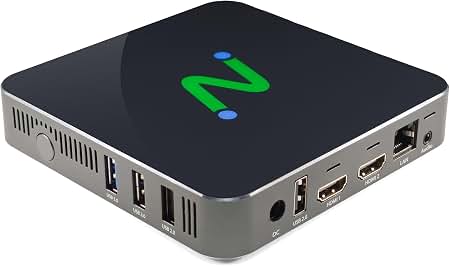
Price (Inc. Tax): KSh44,080
The NComputing L400 Thin Client is a compact and efficient desktop virtualization device designed for organizations that want to provide users with a reliable Windows desktop experience while keeping endpoint hardware simple and easy to manage. Developed specifically for NComputing vSpace Pro, the L400 provides a practical way to connect users to centrally hosted virtual desktops, applications, and computing resources.
Built on a low-power quad-core ARM platform, the NComputing L400 combines efficient performance with a compact, fanless design. It supports Quad-HD multimedia at up to 2560 × 1440 resolution, HDMI video output, wired Ethernet networking, USB peripheral connectivity, and centralized device management. These features make it suitable for businesses, schools, training institutions, computer laboratories, libraries, call centers, and other environments where multiple users need access to centrally managed computing resources.
The NComputing L400 is not designed to operate like a conventional standalone desktop computer. Instead, it functions as an endpoint that connects users to a centralized NComputing vSpace Pro environment. This approach allows organizations to host computing resources centrally while deploying lightweight devices at individual workstations.
With a virtual desktop infrastructure, applications and user sessions can be managed from a central server environment. The L400 provides the local connection between the user and the hosted desktop. Users can connect a monitor, keyboard, mouse, audio equipment, and supported USB peripherals to the device and interact with their virtual Windows desktop.
This centralized approach can be useful for organizations managing many computers because administrators can establish consistent desktop environments rather than configuring every workstation as an independent PC.
The L400 is compatible with supported NComputing vSpace Pro Enterprise and vSpace Pro LTS environments. NComputing also provides centralized management capabilities through vSpace Console, allowing administrators to configure and manage multiple L400 devices from a central location.
The NComputing L400 uses a quad-core ARM processor operating at 1.8 GHz with 1 GB of RAM. The hardware is designed specifically for thin-client and virtual desktop workloads, where the endpoint does not need to perform all of the computing tasks of a traditional desktop PC.
The low-power architecture helps keep the device compact and efficient while providing the processing capability required for connecting to a virtualized desktop environment. Computing-intensive applications can run within the centralized vSpace Pro infrastructure while the L400 handles the user’s local display, peripheral connectivity, network communication, and other endpoint functions.
This makes the L400 particularly useful when an organization wants to deploy many workstations without placing a full desktop computer at every desk.
One of the key features of the NComputing L400 is its ability to support Quad-HD resolution of up to 2560 × 1440 in supported vSpace Pro configurations. The device uses an HDMI output for connecting a compatible monitor.
The higher display resolution can be useful in modern office environments where users work with detailed documents, spreadsheets, dashboards, browser applications, and other visual content. The L400 is designed to deliver a responsive virtual desktop experience while supporting multimedia playback through compatible vSpace Pro features.
Organizations should note that maximum display resolution can depend on the vSpace Pro edition and configuration being used. NComputing documentation indicates QHD support with vSpace Pro Enterprise Edition, while certain other editions support lower maximum resolutions.
The L400 incorporates NComputing technologies designed to improve multimedia performance within virtual desktop environments. These include vCAST Streaming and UXP Turbo.
vCAST Streaming is designed to reduce the amount of server-side processing required for supported multimedia content. By making use of client-side rendering and playback, it can help reduce server CPU usage and network traffic while allowing media content to play more smoothly.
UXP Turbo is designed to enhance the virtual desktop experience for activities such as video playback, browser scrolling, 3D rendering, and other multimedia-intensive applications. In supported environments, this technology can improve the responsiveness of applications running through the virtual desktop infrastructure.
These capabilities make the L400 more suitable for environments where users need more than basic text-based applications and may regularly interact with multimedia content.
The NComputing L400 provides three USB 2.0 ports, allowing users to connect a variety of compatible peripherals. This provides flexibility when setting up the device as a complete workstation.
Supported peripheral types can include keyboards, mice, USB printers, webcams, USB storage devices, smart-card readers, headsets, speakers, signature pads, USB-to-serial adapters, and other compatible USB devices.
Through transparent USB redirection, supported peripherals can be made available within the virtual desktop environment. This means that users can work with local devices while their primary computing environment remains centralized.
For example, an employee can use a USB webcam for a supported video-conferencing application, connect a printer, or use a compatible smart-card reader while accessing a centrally hosted Windows desktop.
The L400 includes a 10/100 Ethernet RJ45 port for wired network connectivity. A stable network connection is an important part of any thin-client deployment because the L400 relies on network communication to access the virtual desktop environment.
The wired Ethernet connection allows the device to be integrated into an organization’s existing network infrastructure. It can be deployed in offices, classrooms, laboratories, reception areas, libraries, and other locations where wired network connectivity is available.
The L400 also supports enterprise network security capabilities, including 802.1X authentication in supported configurations. This can help organizations integrate the device into managed network environments where user and device authentication is required.
Managing a large number of computers can require considerable time when each device must be configured individually. The NComputing L400 addresses this challenge through centralized management capabilities available within the vSpace Pro ecosystem.
Administrators can use vSpace Console to configure and manage L400 devices. Device settings can be standardized and applied across multiple endpoints, helping organizations maintain consistent configurations.
For larger deployments, supported NComputing management solutions can provide additional remote management capabilities. This can be particularly useful for organizations operating multiple classrooms, departments, branches, or geographically distributed offices.
Centralized management can simplify tasks such as configuration, firmware updates, device monitoring, and troubleshooting. Instead of visiting every workstation individually, administrators can manage many endpoints from a centralized management interface.
The NComputing L400 has a compact form factor that allows it to fit easily into modern workspaces. Its fanless design means it has no moving cooling fan, allowing the device to operate quietly.
The L400 can be positioned on a desktop or mounted behind a compatible monitor using a VESA mounting solution. Mounting the device behind a monitor can help create a clean and organized workstation by reducing the amount of hardware visible on the desk.
This compact design is especially useful in environments where desk space is limited, including computer laboratories, classrooms, offices, reception areas, libraries, and call centers.
The NComputing L400 can be an effective endpoint for educational institutions using desktop virtualization. Schools, colleges, universities, training centers, and computer laboratories can deploy multiple L400 devices while managing their virtual desktop environment centrally.
Instead of installing a complete PC at every student workstation, institutions can use thin clients connected to a centralized computing environment. This can simplify deployment and provide administrators with greater control over the software environment available to students.
The centralized model can also help maintain standardized application configurations across a computer laboratory. Administrators can manage the virtual desktop environment centrally while students access their assigned computing sessions through the L400.
Businesses can also use the L400 as an endpoint for employees who primarily work with centrally hosted Windows applications and desktops.
It can be suitable for administrative offices, customer service departments, reception desks, call centers, shared workstations, and other environments where users need access to standardized applications.
The compact design helps maintain an organized workspace, while centralized management can make it easier for IT teams to administer multiple endpoints.
The L400 can also be useful for organizations that want to reduce the complexity associated with maintaining a large fleet of traditional desktop computers.
The L400 is designed for straightforward deployment within a compatible vSpace Pro environment. Once connected to power, a monitor, network, keyboard, and mouse, the device can be configured to connect to the appropriate virtual desktop infrastructure.
The device can automatically receive supported updates from vSpace Pro servers, while administrators can use centralized management tools to maintain multiple endpoints.
This approach can reduce the amount of manual maintenance required at individual workstations. Instead of treating every device as a separate computer, IT administrators can manage the endpoints as part of a larger virtual desktop environment.
The L400 includes several features designed for enterprise environments. Supported configurations include VPN clients and 802.1X enterprise network authentication.
VPN support can be useful where users need to connect securely to virtual desktop environments across suitable network infrastructure. The supported VPN technologies include OpenVPN, OpenConnect, PPTP, IPSec L2TP, IPSec IKEv2, and FortiClient SSL VPN in supported configurations.
Organizations can therefore consider the L400 for different deployment scenarios depending on their network architecture and security requirements.
The NComputing L400 provides a practical combination of compact hardware, virtualization support, multimedia capabilities, USB connectivity, and centralized management. Its design makes it particularly relevant for organizations that need to deploy multiple workstations while keeping endpoint hardware simple.
By connecting to NComputing vSpace Pro, the L400 allows users to access supported Windows desktop environments without requiring a conventional full-size desktop computer at every workstation.
Its quad-core ARM platform, HDMI connectivity, QHD display support, USB 2.0 ports, wired Ethernet connection, fanless construction, and centralized management capabilities make it a flexible endpoint for a wide range of professional and educational environments.
Whether deployed in a business office, school computer laboratory, training center, library, call center, or shared workstation environment, the NComputing L400 can provide users with access to centrally managed virtual desktops through a compact and efficient endpoint.
For organizations considering desktop virtualization, the L400 should be evaluated together with the required vSpace Pro edition, server capacity, licensing, network infrastructure, applications, peripherals, and number of users. When properly configured, the NComputing L400 provides a streamlined endpoint solution for centralized Windows desktop access.
NComputing L400 – Official Manufacturer Website


Reviews
There are no reviews yet.