Description
MikroTik RB750r2 – Affordable and Compact Router for Home and Small Office
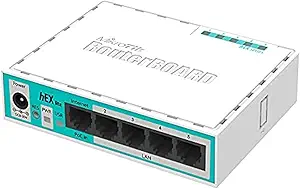
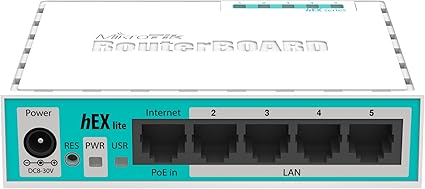
The MikroTik RB750r2, also known as the hEX lite, is a cost-effective and compact router designed to provide efficient network management for home users and small offices. This router offers a combination of affordability, reliability, and essential features, making it an ideal choice for those seeking a straightforward solution for their networking needs.
Key Features
- Compact and Lightweight Design: The RB750r2 features a compact and lightweight design, making it easy to install and place in any environment. Its small footprint ensures that it fits comfortably on a desk or shelf without taking up much space.
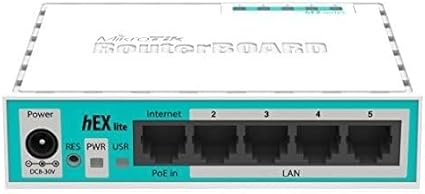
- Five Fast Ethernet Ports: Equipped with five Fast Ethernet (10/100 Mbps) ports, the RB750r2 allows for multiple wired connections to various devices, such as computers, printers, and smart TVs. This ensures reliable wired connectivity for devices that require a stable network connection.
- Powerful RouterOS Operating System: Running on MikroTik’s RouterOS, the RB750r2 provides advanced networking features, including routing, firewall management, bandwidth control, and VPN capabilities. This operating system offers flexibility and customization to meet specific network requirements.
- User-Friendly Management Interface: The RB750r2 comes with an intuitive web-based management interface, along with Winbox access, making it easy for users to configure and monitor their network settings. This ease of use is beneficial for users with varying levels of technical expertise.
- Energy Efficient: The RB750r2 is designed to be energy-efficient, consuming minimal power while delivering reliable performance. This makes it an eco-friendly choice for users who are conscious of their energy usage.
- Robust Security Features: With built-in firewall capabilities and user authentication options, the RB750r2 provides essential security features to protect your network from unauthorized access and potential cyber threats.
- Affordable Pricing: One of the standout features of the RB750r2 is its affordability. It offers essential networking features at a budget-friendly price, making it accessible to a wide range of users.
Applications
- Home Networking: The RB750r2 is perfect for home users who need a reliable and affordable router to manage their internet connections. It can handle typical household networking tasks such as web browsing, streaming, and online gaming.
- Small Office Networking: Small offices can benefit from the RB750r2’s features, providing stable internet connectivity for multiple users and devices. Its compact design and energy efficiency make it an ideal choice for office environments.
- Educational Institutions: Schools and educational institutions can use the RB750r2 to deliver dependable internet access to students and staff, enhancing the overall learning experience.
- Remote Work: For remote workers, the RB750r2 offers a secure and stable connection to company networks, ensuring efficient and reliable access to work resources from home.
Installation Guide
- Unbox the Device: Remove the RB750r2 from its packaging and ensure all accessories, including the power supply and mounting hardware, are present.
- Select an Installation Location: Choose a suitable, well-ventilated location for the router. Its compact design allows it to fit easily on a desk or shelf.
- Connect Power: Plug the included power adapter into the router and connect it to a power outlet. The LED indicators will confirm that the device is powered on and functioning.
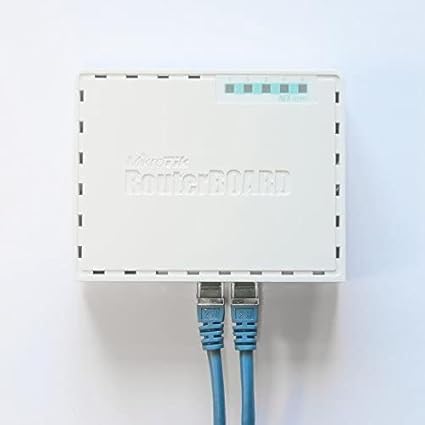
- Connect Network Devices: Use Ethernet cables to connect devices to the Fast Ethernet ports. This provides stable wired connections for computers, printers, and other network-enabled devices.
- Access the Management Interface: Connect a computer to one of the Ethernet ports and access the router’s web management interface using the default IP address (usually 192.168.88.1).
- Log In and Configure: Use the default credentials (admin/admin) to log in and configure your network settings, including DHCP, firewall rules, and bandwidth management based on your needs.
- Monitor Performance: Utilize the management interface to monitor network performance and make adjustments as necessary to optimize usage.
Advantages of RB750r2
- Affordable and Cost-Effective: The device offers essential networking features at a budget-friendly price, making it an excellent choice for cost-conscious users.
- Compact and Lightweight: Its small and lightweight design allows for easy installation in any environment, whether at home or in a small office.
- User-Friendly Management: The intuitive management interface is accessible for users of all technical backgrounds, enabling easy configuration and monitoring.
- Robust Security Features: Built-in security options help protect your network from unauthorized access and cyber threats.
- Energy Efficient: The low power consumption of the RB750r2 makes it an eco-friendly option, reducing energy usage while maintaining reliable performance.
Conclusion
The MikroTik RB750r2 is a compact, affordable, and efficient router that meets the needs of home users and small offices. With its robust features, user-friendly management interface, and energy efficiency, it provides a reliable networking solution for a variety of environments. Whether you need to manage a home network, support a small office, or ensure stable internet access for remote work, the RB750r2 delivers the performance and flexibility required to keep your network running smoothly. By choosing the RB750r2, you can enjoy a cost-effective and reliable networking experience that supports your connectivity needs.
MikroTik RB750r2 – Affordable and Compact Router for Home and Small Office
The MikroTik RB750r2, also known as the hEX lite, is a cost-effective and compact router designed to provide efficient network management for home users and small offices. This router offers a combination of affordability, reliability, and essential features, making it an ideal choice for those seeking a straightforward solution for their networking needs.
Key Features
- Compact and Lightweight Design: The RB750r2 features a compact and lightweight design, making it easy to install and place in any environment. Its small footprint ensures that it fits comfortably on a desk or shelf without taking up much space.
- Five Fast Ethernet Ports: Equipped with five Fast Ethernet (10/100 Mbps) ports, the RB750r2 allows for multiple wired connections to various devices, such as computers, printers, and smart TVs. This ensures reliable wired connectivity for devices that require a stable network connection.
- Powerful RouterOS Operating System: Running on MikroTik’s RouterOS, the RB750r2 provides advanced networking features, including routing, firewall management, bandwidth control, and VPN capabilities. This operating system offers flexibility and customization to meet specific network requirements.
- User-Friendly Management Interface: The RB750r2 comes with an intuitive web-based management interface, along with Winbox access, making it easy for users to configure and monitor their network settings. This ease of use is beneficial for users with varying levels of technical expertise.
- Energy Efficient: The RB750r2 is designed to be energy-efficient, consuming minimal power while delivering reliable performance. This makes it an eco-friendly choice for users who are conscious of their energy usage.
- Robust Security Features: With built-in firewall capabilities and user authentication options, the RB750r2 provides essential security features to protect your network from unauthorized access and potential cyber threats.
- Affordable Pricing: One of the standout features of the RB750r2 is its affordability. It offers essential networking features at a budget-friendly price, making it accessible to a wide range of users.
Applications
- Home Networking: The RB750r2 is perfect for home users who need a reliable and affordable router to manage their internet connections. It can handle typical household networking tasks such as web browsing, streaming, and online gaming.
- Small Office Networking: Small offices can benefit from the RB750r2’s features, providing stable internet connectivity for multiple users and devices. Its compact design and energy efficiency make it an ideal choice for office environments.
- Educational Institutions: Schools and educational institutions can use the RB750r2 to deliver dependable internet access to students and staff, enhancing the overall learning experience.
- Remote Work: For remote workers, the RB750r2 offers a secure and stable connection to company networks, ensuring efficient and reliable access to work resources from home.
Installation Guide
- Unbox the Device: Remove the device from its packaging and ensure all accessories, including the power supply and mounting hardware, are present.
- Select an Installation Location: Choose a suitable, well-ventilated location for the router. Its compact design allows it to fit easily on a desk or shelf.
- Connect Power: Plug the included power adapter into the router and connect it to a power outlet. The LED indicators will confirm that the device is powered on and functioning.
- Connect Network Devices: Use Ethernet cables to connect devices to the Fast Ethernet ports. This provides stable wired connections for computers, printers, and other network-enabled devices.
- Access the Management Interface: Connect a computer to one of the Ethernet ports and access the router’s web management interface using the default IP address (usually 192.168.88.1).
- Log In and Configure: Use the default credentials (admin/admin) to log in and configure your network settings, including DHCP, firewall rules, and bandwidth management based on your needs.
- Monitor Performance: Utilize the management interface to monitor network performance and make adjustments as necessary to optimize usage.
Advantages of RB750r2
- Affordable and Cost-Effective: The device offers essential networking features at a budget-friendly price, making it an excellent choice for cost-conscious users.
- Compact and Lightweight: Its small and lightweight design allows for easy installation in any environment, whether at home or in a small office.
- User-Friendly Management: The intuitive management interface is accessible for users of all technical backgrounds, enabling easy configuration and monitoring.
- Robust Security Features: Built-in security options help protect your network from unauthorized access and cyber threats.
- Energy Efficient: The low power consumption of the RB750r2 makes it an eco-friendly option, reducing energy usage while maintaining reliable performance.
Conclusion
The MikroTik RB750r2 is a compact, affordable, and efficient router that meets the needs of home users and small offices. With its robust features, user-friendly management interface, and energy efficiency, it provides a reliable networking solution for a variety of environments. Whether you need to manage a home network, support a small office, or ensure stable internet access for remote work, the device delivers the performance and flexibility required to keep your network running smoothly. By choosing the RB750r2, you can enjoy a cost-effective and reliable networking experience that supports your connectivity needs.




Reviews
There are no reviews yet.