No products in the cart.

Only this weekend
Super Discount
Items on sale this week
Top picks this week. Up to 50% off the best selling products.
Price (Inc. Tax): KSh44,080
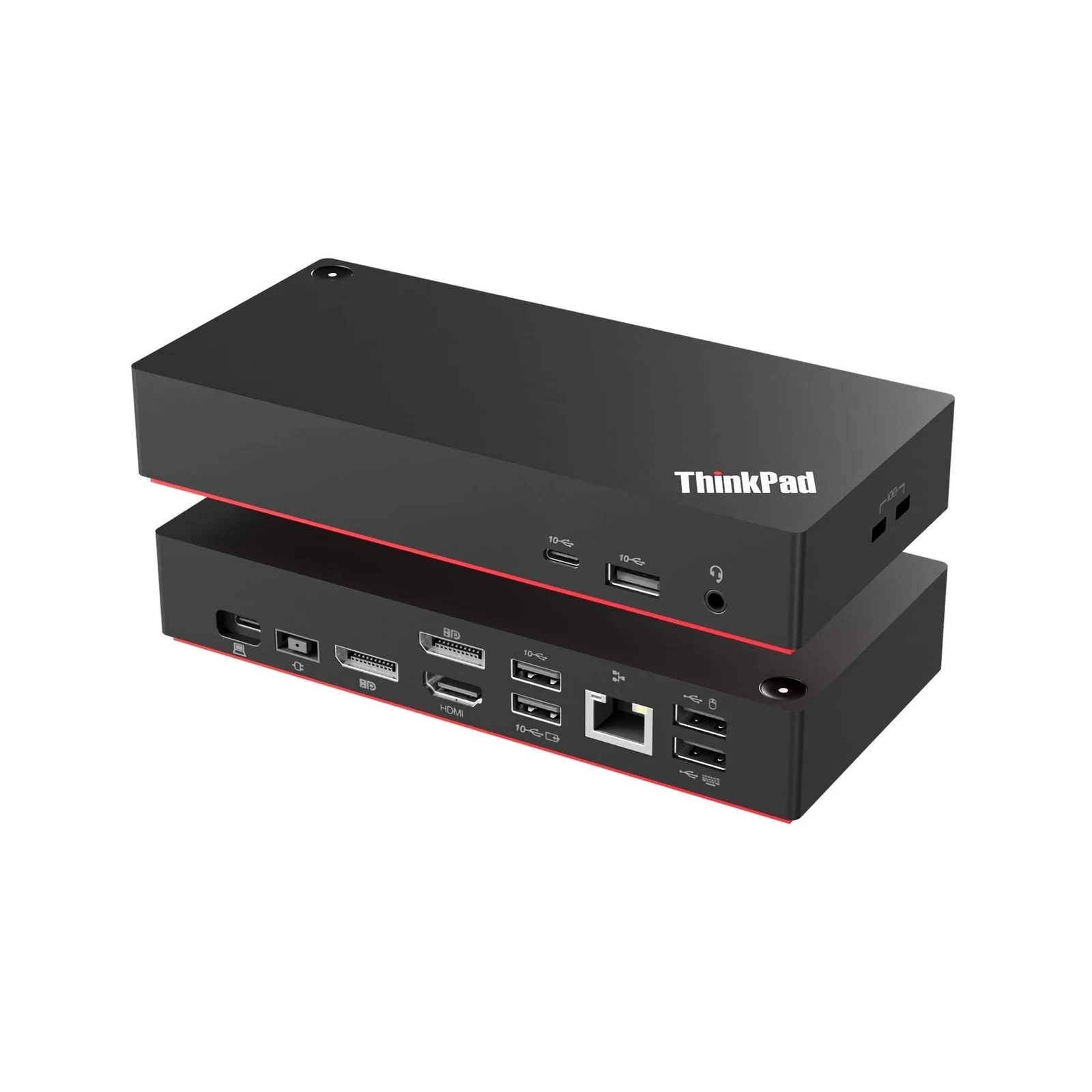
The Lenovo ThinkPad Universal USB-C Dock 40AY0090UK is a versatile and professional docking station designed to make laptop connectivity easier, more efficient, and more convenient. As modern workplaces continue to rely on laptops for everyday business operations, users often need to connect their computers to multiple monitors, keyboards, mice, printers, external storage devices, network connections, audio equipment, and other peripherals. However, many modern laptops have a limited number of physical ports. The Lenovo ThinkPad Universal USB-C Dock provides a practical solution by expanding the available connectivity through a single USB-C connection.
Designed with productivity and convenience in mind, this docking station allows users to create a complete desktop-style workstation around a compatible laptop. Once the dock is connected to the computer, users can access multiple external devices without repeatedly connecting individual cables directly to the laptop. This makes it especially useful for office employees, IT professionals, students, home-office users, businesses, and organizations operating hybrid working environments.
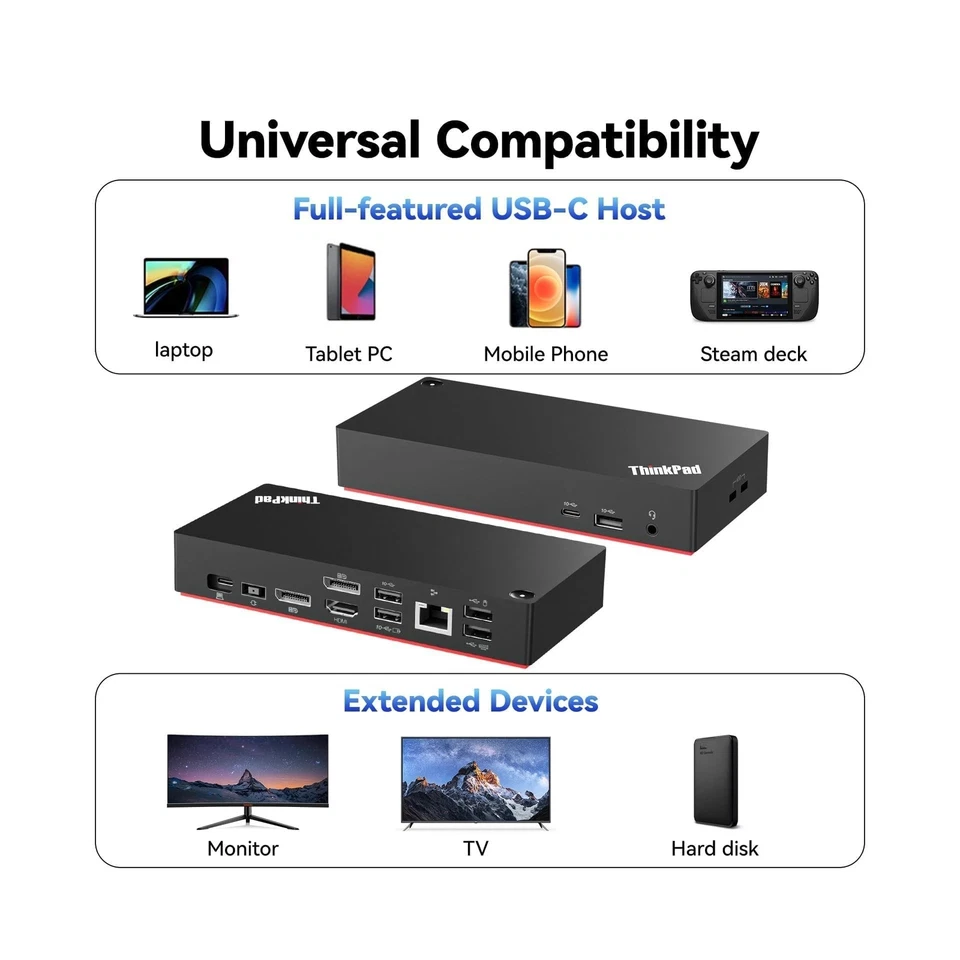
The 40AY0090UK belongs to Lenovo’s ThinkPad Universal USB-C Dock family and is designed to provide broad compatibility with compatible USB-C notebooks. Its universal approach means it can be useful beyond ThinkPad laptops, provided the host computer supports the required USB-C functionality.
One of the biggest advantages of the Lenovo ThinkPad Universal USB-C Dock is its ability to transform a portable laptop into a more comprehensive desktop workstation. A laptop is excellent for mobility, but users working for extended periods may prefer a larger monitor, full-size keyboard, mouse, wired network connection, external storage and other accessories.
Instead of connecting all these peripherals directly to the laptop, users can connect them to the docking station. The laptop then connects to the dock using a single USB-C cable. This significantly reduces the number of cables that need to be connected and disconnected whenever the user moves between workstations.
For example, an employee can have two external monitors, a keyboard, mouse, Ethernet cable, printer and other USB accessories permanently connected to the dock. When they arrive at their desk, they simply connect their laptop to the dock and immediately gain access to the workstation setup.
This makes the Lenovo ThinkPad Universal USB-C Dock particularly useful for hybrid working, shared desks, hot-desking and flexible office environments.
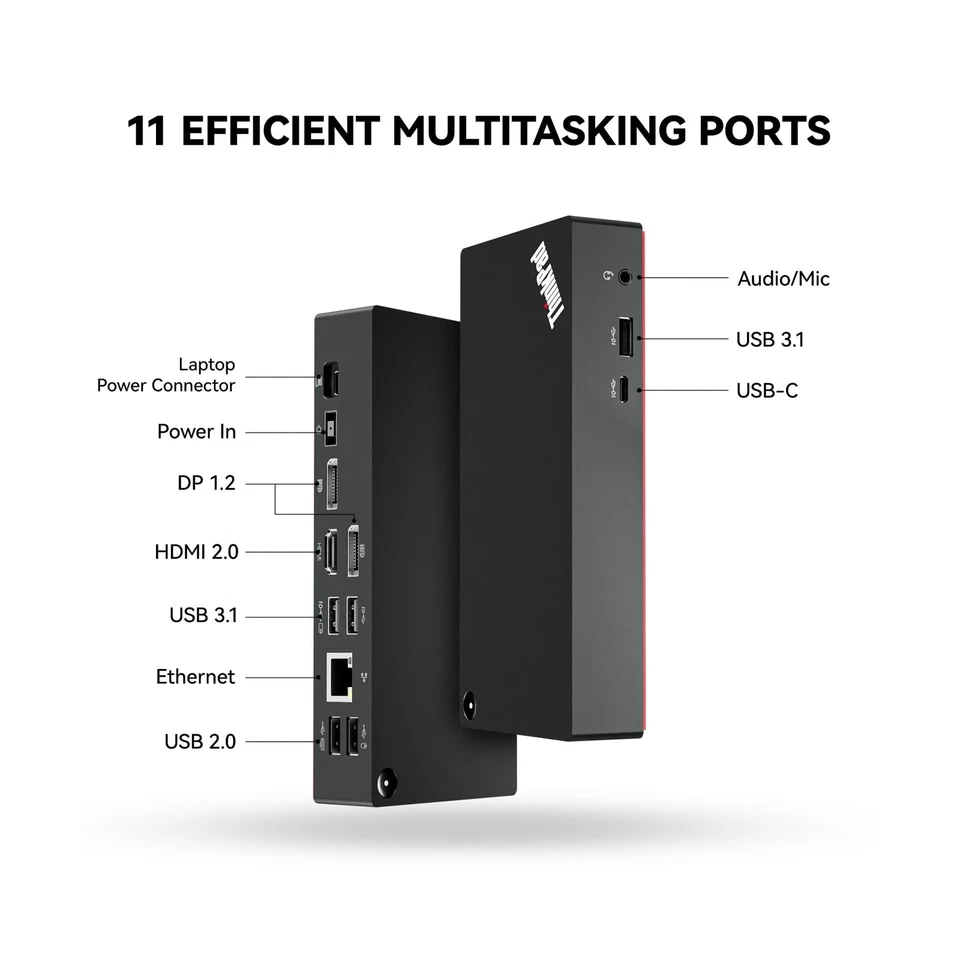
For professionals who need additional screen space, the ThinkPad Universal USB-C Dock provides multiple display connections. It includes two DisplayPort 1.4 outputs and one HDMI 2.0 output, giving users flexibility when connecting external monitors.
Multiple displays can make a significant difference when performing tasks that require constant reference to several applications. A financial professional can keep spreadsheets open on one screen while monitoring reports on another. A developer can use one monitor for coding and another for documentation or testing. Administrative staff can keep email, documents and business applications visible simultaneously.
The available display configuration depends on the capabilities of the connected laptop, operating system and monitors. Therefore, users should check compatibility when planning a specific multi-monitor setup.
The Lenovo ThinkPad Universal USB-C Dock provides several USB ports for connecting common peripherals and accessories. It includes USB-A ports and a high-speed USB-C port, allowing users to connect devices such as external hard drives, flash drives, keyboards, mice, printers, webcams and other USB equipment.
The high-speed USB connectivity is useful when transferring files between the laptop and external storage devices. Businesses that frequently work with documents, presentations, photographs, videos and other large files can benefit from having additional high-speed USB connections readily available.
The availability of multiple USB ports also reduces the need for users to purchase separate USB hubs. This contributes to a cleaner and more organized workspace.
Although Wi-Fi is widely used today, wired Ethernet remains important in many professional environments. The Lenovo ThinkPad Universal USB-C Dock includes a Gigabit Ethernet port, allowing a compatible laptop to connect to a wired network through the docking station.
A wired network connection can be beneficial in offices, schools, laboratories, server environments and other workplaces where a stable network connection is required.
For laptops that do not have a built-in Ethernet port, the dock provides a convenient way to connect to a wired network without purchasing a separate Ethernet adapter.
This is particularly useful for employees who require dependable connectivity for cloud applications, file servers, video conferencing, online systems and other business services.
The main connection between the docking station and the compatible laptop is USB-C. This provides a simple and convenient way to connect multiple workstation peripherals through one cable.
USB-C has become increasingly common across modern laptops because of its compact design and versatility. Depending on the capabilities of the connected computer, USB-C can carry data, display signals and power.
With the Lenovo ThinkPad Universal USB-C Dock, users can therefore minimize the number of cables attached directly to their laptops. This makes the workstation easier to manage and gives the laptop a cleaner appearance when connected to external equipment.
The docking station also supports power delivery to compatible laptops. When used with the appropriate power adapter and a compatible computer, the dock can supply power while the laptop is connected to external peripherals.
This means users may be able to charge their laptop while simultaneously using external monitors, USB devices, Ethernet and other accessories.
Lenovo specifies up to 65W power output with the supplied 90W adapter, while compatible configurations can provide up to 100W with a suitable 135W adapter.
This feature helps reduce cable clutter because users can potentially use one connection between the laptop and docking station for both connectivity and charging.
However, charging performance depends on the connected laptop and its power requirements. Users should verify the specifications of their particular laptop before relying on the dock as its primary charging source.
The workplace has changed significantly, with many employees now dividing their time between offices, homes and other locations. The Lenovo ThinkPad Universal USB-C Dock is well suited to this type of working arrangement.
At an office workstation, the dock can remain permanently connected to monitors, keyboard, mouse, Ethernet and other equipment. When an employee needs to attend a meeting or work elsewhere, they can simply disconnect the USB-C cable from the laptop.
When they return, reconnecting the laptop restores access to the workstation.
This simple approach saves time and reduces the frustration associated with repeatedly connecting multiple peripherals.
Cable management is another important advantage of using a docking station. Without a dock, a laptop connected to several peripherals can quickly become surrounded by multiple cables.
The ThinkPad Universal USB-C Dock acts as a central connection point. Most peripheral cables remain connected to the dock, while the laptop requires only the primary USB-C connection.
This can create a cleaner and more professional-looking desk. It can also make it easier for IT departments to standardize employee workstations.
The Lenovo ThinkPad Universal USB-C Dock is suitable for a wide range of professional environments. Organizations can use docking stations to provide employees with consistent workstation configurations while allowing them to retain the flexibility of laptop computing.
It can be used in:
For organizations deploying multiple laptops, standardized docking stations can make workstation setup easier and more consistent.
The docking station is designed with physical security considerations in mind. It includes security lock options that can help secure the device in a fixed workstation environment.
This can be useful in offices, schools, laboratories, libraries, training centres and other locations where equipment may be installed in shared or publicly accessible areas.
Physical security features can provide an additional layer of protection against unauthorized removal of the docking station.
Despite offering a wide range of connectivity options, the Lenovo ThinkPad Universal USB-C Dock maintains a compact form factor. Its professional black design fits naturally into modern office environments and complements Lenovo ThinkPad computers.
The compact construction makes it easy to position the Lenovo ThinkPad Universal USB-C Dock on a desk without taking up excessive workspace. This is particularly useful for employees working in smaller offices or shared workstations.
The dock can also be positioned conveniently alongside a monitor or laptop stand, helping users maintain a more organized workstation.
The ThinkPad Universal USB-C Dock is designed around simplicity. Once the peripherals have been connected to the docking station, users do not need to repeatedly connect and disconnect each device from their laptop.
This is particularly helpful for people who frequently move their laptops.
For example, a sales representative may disconnect their laptop from the Lenovo ThinkPad Universal USB-C Dock when attending a client meeting and reconnect it upon returning to the office. Similarly, a student can use the laptop independently and then connect it to a monitor and other peripherals when working at a study desk.
The one-cable concept makes these transitions faster and more convenient.
The Lenovo ThinkPad Universal USB-C Dock 40AY0090UK provides a practical solution for users who want greater connectivity without sacrificing the portability of their laptops. Its combination of display outputs, USB ports, Ethernet connectivity, audio support and power delivery makes it a useful addition to both professional and personal workstations.
Rather than purchasing and managing several individual adapters, users can consolidate many common connections into one Lenovo ThinkPad Universal USB-C Dock . This can reduce cable clutter, simplify workstation management and improve the overall user experience.
For businesses, the dock can also support a more standardized approach to workstation deployment. Employees can use compatible laptops as mobile devices while still having access to desktop-style connectivity when working at their primary desks.
Overall, the Lenovo ThinkPad Universal USB-C Dock 40AY0090UK is a strong choice for professionals, businesses, educators, IT departments and home-office users looking for a reliable way to expand laptop connectivity. Its compact design, versatile ports, multi-monitor capability and one-cable workstation setup make it suitable for the demands of modern computing.
Lenovo Official Website:
https://www.lenovo.com/
Radox Technology Limited:
https://www.radox.co.ke/


Reviews
There are no reviews yet.