No products in the cart.

Only this weekend
Super Discount
Items on sale this week
Top picks this week. Up to 50% off the best selling products.
Price (Inc. Tax): KSh34,800
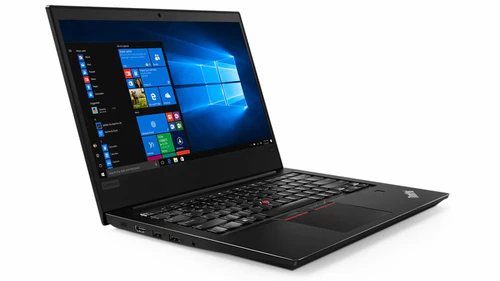
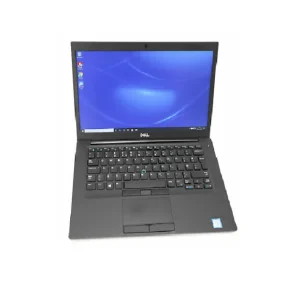
The Lenovo ThinkPad L420 is a reliable and versatile laptop designed to meet the demands of professionals and students alike. With its robust build quality, user-friendly features, and efficient performance, this device is a solid choice for anyone seeking a dependable workhorse.
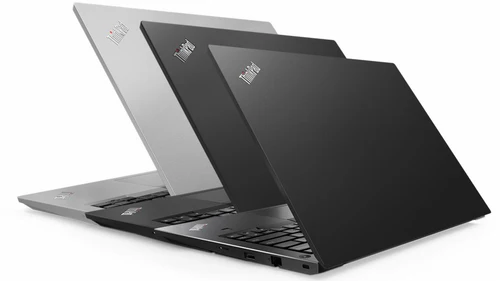
The Lenovo ThinkPad L420 is characterized by its classic ThinkPad design, which emphasizes durability and practicality. The chassis is constructed from high-quality materials that withstand the rigors of daily use, ensuring that the laptop remains functional and attractive over time. Weighing approximately 5.3 pounds (2.4 kg), it strikes a balance between portability and sturdiness, making it suitable for both office and on-the-go use.
The 14-inch display features a resolution of 1366 x 768 pixels, delivering crisp images and vibrant colors. The anti-glare coating helps reduce reflections, making it easier to work in various lighting conditions, whether in a conference room or outdoors.
Under the hood, the Lenovo L420 is powered by an Intel Core i5-2520M processor, which provides solid performance for everyday tasks. With a base clock speed of 2.5 GHz and the ability to turbo boost up to 3.2 GHz, this dual-core processor efficiently handles multitasking, web browsing, and productivity applications.
Paired with 4 GB of DDR3 RAM, the L420 supports smooth multitasking, enabling users to run multiple applications without significant lag. Whether you are working on spreadsheets, editing documents, or conducting research, this laptop is up to the task.
The Lenovo ThinkPad L420 comes equipped with a 500 GB HDD, providing ample storage space for documents, multimedia files, and applications. The hard drive ensures that you have enough room for your data while allowing for quick access to frequently used files.
For graphics, the laptop features integrated Intel HD Graphics 3000, which is suitable for everyday tasks such as video playback, basic photo editing, and casual gaming. While it may not be ideal for high-end gaming or intensive graphic design work, it performs well for standard business applications and media consumption.
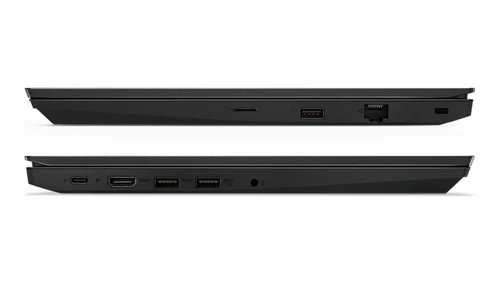
The Lenovo L420 is designed to keep you connected, featuring a variety of ports to support multiple devices:
In addition to these ports, the laptop supports Wi-Fi 802.11n and Bluetooth 4.0, ensuring you can connect to the internet and other devices wirelessly with ease.
The ThinkPad series is renowned for its exceptional keyboards, and the Lenovo ThinkPad L420 is no exception. The full-sized keyboard features well-spaced keys that provide a comfortable typing experience, even during long hours of work. The keyboard is spill-resistant, adding a layer of durability for everyday use.
The touchpad is smooth and responsive, supporting multi-touch gestures for enhanced navigation. Additionally, the L420 includes the iconic TrackPoint, allowing users to navigate the screen efficiently without moving their hands from the keyboard.
The Lenovo ThinkPad L420 offers decent battery life, typically lasting around 5 to 7 hours depending on usage. This allows users to work throughout the day without constantly needing to recharge. For those who need to extend their usage, the laptop supports Lenovo’s Energy Management software, which helps optimize battery performance.
Security is a key focus for the ThinkPad series. The L420 comes with several features designed to protect your data:
The Lenovo ThinkPad L420 typically ships with Windows 10 Pro, offering a user-friendly interface and access to a wide range of productivity applications. Windows 10 Pro includes advanced security features, remote desktop capabilities, and improved performance for business tasks.
In summary, the Lenovo ThinkPad L420 is a robust and efficient laptop that caters to the needs of professionals and students alike. Its durable design, solid performance, and extensive connectivity options make it a reliable companion for various tasks. Whether you’re in the office, attending classes, or working remotely, the Lenovo ThinkPad L420provides the performance and functionality you need to stay productive.
For further information or to explore more options, visit


Reviews
There are no reviews yet.