Description
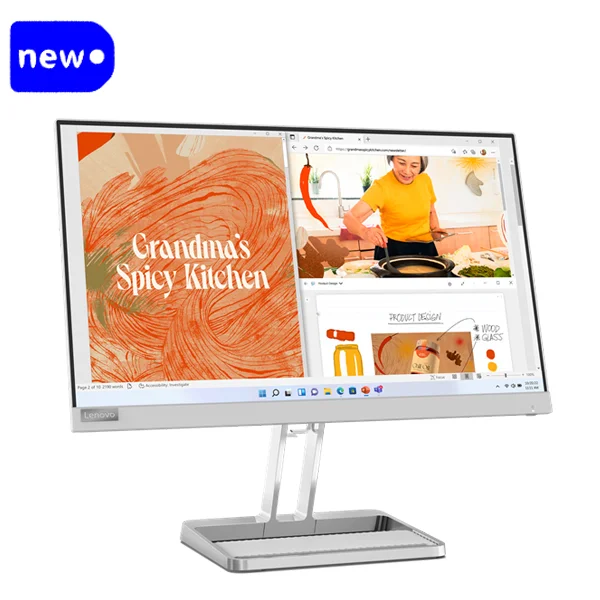
Lenovo L22i-40 21.5″ FHD Monitor with Integrated Speakers, Cloud Grey Color
Introduction
The Lenovo L22i-40 is a sleek and stylish 21.5-inch Full HD monitor designed for users who want high-quality display performance in a compact and modern package. Offering exceptional clarity, vibrant colors, and a space-saving design, this monitor is an excellent choice for both home and office environments. The integrated speakers provide an all-in-one solution for users who require both great visuals and sound without needing additional peripherals.
The cloud grey color gives the monitor a modern and sophisticated look, fitting seamlessly into contemporary workspaces or personal setups. The VGA and HDMI 1.4 connectivity options offer versatility for various devices such as PCs, laptops, gaming consoles, and more.
Key Features
-
21.5-inch Full HD Display
- The Lenovo L22i-40 features a 21.5-inch Full HD (1920×1080) display, offering clear and sharp images. Whether you’re working, streaming, or gaming, the high resolution ensures detailed visuals and a comfortable viewing experience. The monitor’s wide viewing angles allow for consistent and vibrant colors from almost any direction.
-
Integrated Speakers
- With integrated speakers, the L22i-40 eliminates the need for external speakers or headphones, making it ideal for both work and entertainment. The built-in speakers provide clear audio for videos, music, and video calls, delivering a full multimedia experience with minimal setup.
-
Cloud Grey Color
- The monitor’s cloud grey color adds a touch of elegance and modernity to any workspace. It complements a variety of interior designs, whether at home, in the office, or a gaming setup. The neutral tone makes it versatile for both professional and personal settings.
-
Connectivity Options
- The Lenovo L22i-40 offers multiple connectivity options, including:
- 1 VGA Port: Perfect for connecting older devices or those that use VGA.
- 1 HDMI 1.4 Port: Ensures compatibility with newer devices such as laptops, gaming consoles, and streaming devices that require HDMI inputs. The HDMI connection also supports higher resolutions and refresh rates for smooth visuals.
-
Slim and Compact Design
- The L22i-40 is designed with a slim bezel and a minimalist style that saves desk space and gives your workspace a modern, clean appearance. The compact size is perfect for smaller desks, and the lightweight design makes it easy to move or mount.
-
Eye Comfort Features
- The Lenovo L22i-40 incorporates eye comfort features, such as low blue light technology, to reduce eye strain during extended viewing sessions. The flicker-free display ensures smoother visuals, contributing to a more comfortable experience when working, studying, or gaming for long hours.
-
Energy Efficient
- The Lenovo L22i-40 is designed with energy efficiency in mind. It complies with international energy-saving standards, helping to reduce your overall electricity consumption. The monitor is built to be eco-friendly, making it a sustainable choice for those who are conscious of energy usage.
-
Tilt Adjustability
- The monitor features a tilt adjustment function, allowing users to customize the viewing angle for optimal comfort. Whether you’re standing or sitting, you can adjust the tilt to reduce glare and ensure that you have a comfortable viewing experience.
-
Modern Slim Stand
- The monitor comes with a slim, contemporary stand, which contributes to its elegant look while providing stability on your desk. The stand is designed for space efficiency, making the monitor suitable for compact setups.
Specifications
- Model: Lenovo L22i-40 21.5″ FHD Monitor
- Display Size: 21.5 inches
- Resolution: 1920 x 1080 pixels (Full HD)
- Panel Type: IPS (In-Plane Switching)
- Brightness: 250 cd/m²
- Response Time: 6ms (GTG)
- Viewing Angles: 178° (horizontal), 178° (vertical)
- Contrast Ratio: 1000:1 (Typical)
- Color Gamut: 72% NTSC
- Integrated Speakers: Yes (2 x 2W)
- Ports:
- 1 VGA Port
- 1 HDMI 1.4 Port
- Tilt Adjustment: Yes, tilt angle: -5° to 22°
- Power Consumption:
- Typical: 18W
- Standby: <0.3W
- Dimensions (without stand): 19.6 x 11.5 x 1.8 inches (498.6 x 292.7 x 45.8mm)
- Weight: 3.3 kg (7.3 lbs)
- Color: Cloud Grey
- Mounting Compatibility: VESA Mount (100mm x 100mm)
- Certification: CE, FCC, RoHS
Benefits and Advantages
-
All-in-One Design with Integrated Speakers
- The integrated speakers reduce clutter, eliminating the need for external speakers and providing an easy solution for everyday multimedia use. It’s a convenient feature for people who are looking for simplicity and functionality in one package.
-
Space-Saving and Modern Aesthetic
- The slim profile and cloud grey color of the monitor give it a sleek, modern appearance that fits easily into tight spaces. Whether you’re setting it up in a home office or a professional environment, it complements various workstations.
-
Enhanced Visuals with Full HD Display
- The Full HD resolution on the 21.5-inch display ensures a sharp and crisp viewing experience, making it ideal for a range of tasks such as browsing, working on documents, or watching videos. The IPS panel offers better color accuracy and wide viewing angles for a richer, more vibrant display.
-
Versatile Connectivity
- The combination of VGA and HDMI 1.4 ports ensures that you can connect a wide range of devices, from older computers to modern laptops or gaming consoles. This broad compatibility makes the L22i-40 a great option for both home and office environments.
-
Energy Efficiency and Eco-Friendly
- The Lenovo L22i-40 is built with energy efficiency in mind. Its low power consumption makes it a more eco-friendly option for users who are conscious about their environmental footprint. The monitor adheres to global energy-saving standards, helping reduce electricity costs.
-
Comfortable Viewing Experience
- The tilt adjustable stand and eye comfort features ensure that users can customize the display to meet their comfort needs. The low blue light technology and flicker-free screen contribute to a more enjoyable viewing experience during long hours of use.
-
Affordable and Reliable
- The L22i-40 offers an affordable price for the features it delivers, making it a value-for-money choice for users who want a reliable monitor without breaking the bank. Whether you’re using it for work, study, or entertainment, the L22i-40 offers the performance and reliability you need.
Use Cases
-
Home Office Setup
- The Lenovo L22i-40 is ideal for home office environments. Its compact size, integrated speakers, and Full HD resolution provide everything you need for video conferencing, document editing, and casual browsing.
-
Multimedia and Entertainment
- With the high-quality display and integrated speakers, the L22i-40 is perfect for entertainment purposes such as watching movies, gaming, or listening to music.
-
Education and Learning
- The Lenovo L22i-40 makes for a great study monitor for students, offering clear text and a comfortable viewing experience for reading, online classes, and research.
-
Professional Workspaces
- For office professionals, the L22i-40 provides a versatile monitor for handling a range of tasks from spreadsheets to graphic design. The VGA and HDMI ports ensure seamless connections with various devices.
-
Gaming Setup
- Although it is not a high-refresh-rate gaming monitor, the L22i-40 can serve as a budget-friendly gaming monitor for casual gamers who want sharp visuals without needing the highest level of performance.
Installation and Setup
- Unbox the Monitor: Take the Lenovo L22i-40 out of the packaging and remove any protective covering.
- Attach the Stand: If using it as a desktop monitor, attach the stand to the base of the monitor.
- Connect Devices: Plug your devices into the VGA or HDMI port.
- Power Up: Plug in the included power cable and connect it to a power outlet.
- Adjust Settings: Power on the monitor, and adjust the settings, including brightness and tilt, to your preference.
External Links
For more details about the Lenovo L22i-40 21.5″ FHD Monitor, visit the official Lenovo website:
For purchasing or local services in Kenya, check out Radox Kenya:
Conclusion
The Lenovo L22i-40 21.5″ FHD Monitor is an excellent all-around display, offering Full HD resolution, integrated speakers, and versatile connectivity options in a stylish cloud grey color. Whether for work, entertainment, or casual use, this affordable monitor delivers a great experience with features that enhance productivity and comfort. If you’re looking for a budget-friendly monitor that doesn’t compromise on performance or aesthetics, the L22i-40 is a great option.






Reviews
There are no reviews yet.