No products in the cart.

Only this weekend
Super Discount
Items on sale this week
Top picks this week. Up to 50% off the best selling products.
Price (Inc. Tax): KSh19,720
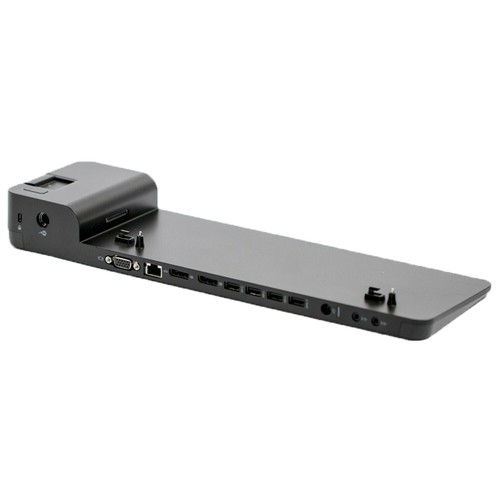
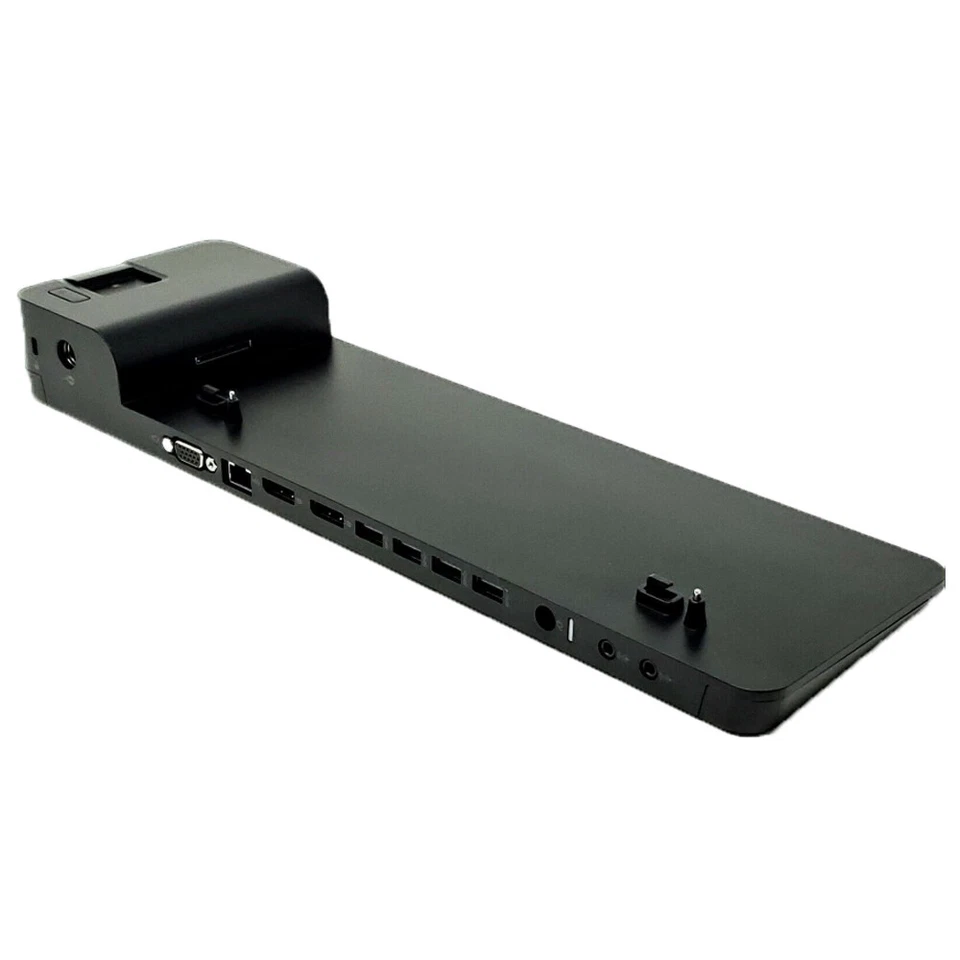
The HP UltraSlim Docking Station 2013 D9Y32AA / D9Y19AA is a compact and practical docking solution designed to expand the connectivity of compatible HP EliteBook notebooks and tablet PCs. It provides users with a convenient way to connect multiple peripherals, external displays, networking equipment and audio devices through a single docking setup. Designed primarily for professional environments, the HP UltraSlim Docking Station 2013 D9Y32AA / D9Y19AA is particularly useful for offices, businesses, educational institutions, government organizations, IT departments and professionals who want to use their laptop as part of a more complete desktop workstation.
Modern laptops are designed for portability, but this portability can sometimes come with fewer physical connection ports. A professional working with an EliteBook may need to connect a keyboard, mouse, printer, external monitor, network cable, audio equipment and other accessories. Connecting each device individually every time can be inconvenient and can result in a workspace filled with cables. The HHP UltraSlim Docking Station 2013 D9Y32AA / D9Y19AA provides a centralized connection point, allowing compatible peripherals to remain connected to the dock while the notebook can be connected and disconnected from the workstation more conveniently.
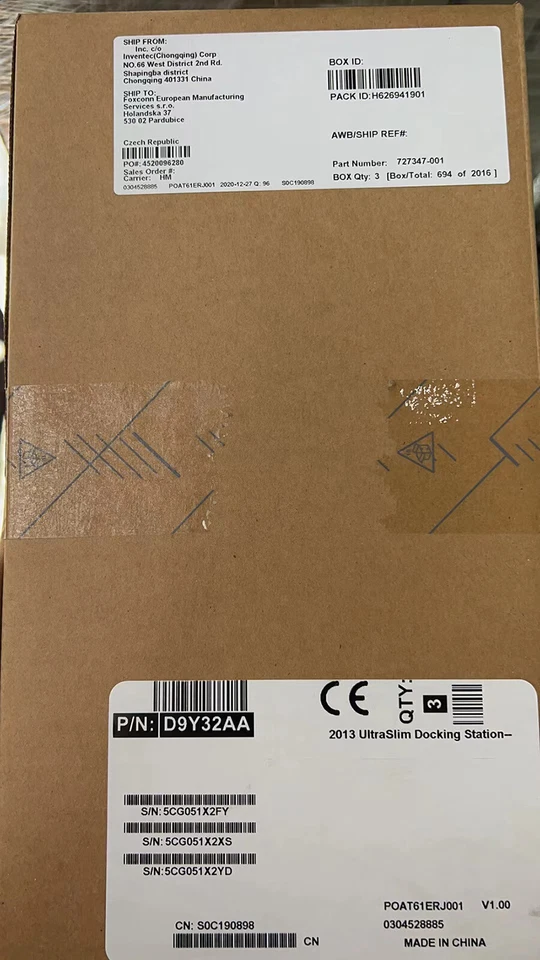
The D9Y32AA is the standalone accessory part number for the 2013 HP UltraSlim Docking Station, while D9Y19AA/D9Y19-series variants can refer to a corresponding configuration or bundled sales part number depending on the market. HP documentation identifies the D9Y32AA as the 2013 HP UltraSlim Docking Station 2013 D9Y32AA / D9Y19AA. HP’s specifications show that the dock provides multiple USB 3.0 connections, two DisplayPort outputs, VGA, Ethernet, audio connections and a 65W AC power solution.
One of the biggest benefits of the HP UltraSlim Docking Station 2013 D9Y32AA / D9Y19AA is that it allows a compatible laptop to function more like a desktop computer while retaining the mobility of a notebook. Users can connect their external accessories to the docking station and leave them permanently attached.
For example, an employee can have a monitor, keyboard, mouse, network cable, printer and other USB devices connected to the HP UltraSlim Docking Station 2013 D9Y32AA / D9Y19AA. When they need to leave their desk, they can disconnect the notebook from the docking station and take it with them. When they return, reconnecting the computer to the dock restores access to the connected workstation equipment.
This approach is particularly useful for employees who frequently move between meetings, offices and workstations. It can also help organizations create standardized desks where employees can easily connect compatible HP notebooks.
The HP UltraSlim Docking Station 2013 D9Y32AA / D9Y19AAprovides two DisplayPort outputs and one VGA port, giving users several options for connecting external displays. HP’s official QuickSpecs identify the DisplayPort connections as DisplayPort 1.1a with DisplayPort 1.2 capability, while noting that the computer, dock and monitor must support DisplayPort 1.2 to take advantage of the associated advanced capabilities.
Having multiple display outputs can improve productivity for users who need to work with several applications simultaneously. A finance employee can use one screen for spreadsheets and another for reports. An administrator can keep email and communication applications on one display while working on documents on another. A developer can use additional screen space for coding, testing, documentation and system monitoring.
The VGA connection also makes the dock useful with older monitors and projectors that may not provide modern digital display inputs. This can be particularly valuable in organizations where existing display equipment is still in use.
The HP UltraSlim Docking Station 2013 D9Y32AA / D9Y19AA provides four USB 3.0 connections, consisting of three standard USB 3.0 ports and one USB 3.0 charging port according to HP’s QuickSpecs.
These ports allow users to connect a variety of everyday peripherals, including:
The USB 3.0 connectivity provides faster data transfer capabilities than older USB 2.0 technology when the connected computer and peripheral also support the required standard.
The dedicated USB charging port is especially useful for compatible USB-powered devices. Users can therefore keep frequently used accessories connected to the docking station rather than occupying the limited ports available on their laptop.
The HP UltraSlim Docking Station 2013 D9Y32AA / D9Y19AA includes an RJ-45 Gigabit Ethernet connection, providing a convenient way to connect a compatible notebook to a wired network. HP lists the network connection as an RJ-45/Ethernet pass-through.
Although wireless networking is now common, wired Ethernet remains important in professional environments where a stable network connection is preferred. Offices, schools, laboratories, call centres, IT departments and other organizations can benefit from providing users with a wired network connection through their docking station.
For compatible laptops that do not provide a convenient Ethernet port, the docking station can also serve as a centralized networking connection.
A wired connection can be useful when working with shared files, business applications, network printers, servers, cloud services and other systems where consistent network performance is important.
The HP UltraSlim Docking Station 2013 D9Y32AA / D9Y19AA also provides dedicated line-in and line-out audio connections. This allows users to connect compatible external audio equipment without having to connect everything directly to the notebook.
The line-out connection can be useful for speakers, headphones and other audio devices, while line-in can support compatible audio input equipment.
For office environments, these connections can make it easier to integrate the laptop into an existing workstation audio setup.
The HP UltraSlim Docking Station 2013 D9Y32AA / D9Y19AA is designed to operate with an external power adapter. HP’s official documentation identifies an energy-efficient 65W Smart AC adapter with integrated surge protection designed to help protect against power fluctuations.
Having a dedicated power supply allows the docking station to provide its connectivity functions while supporting the connected workstation.
A suitable power adapter is particularly important when deploying docking stations in professional environments because reliable power is essential for maintaining a stable workstation.
Customers should confirm the exact adapter configuration included with the particular unit being purchased, especially when dealing with different regional or bundled part numbers.
The HP UltraSlim Docking Station 2013 D9Y32AA / D9Y19AAwas designed with space efficiency in mind. Its slim profile allows it to sit neatly on a desk without taking up excessive workspace.
HP lists dimensions of approximately 36.8 × 10.7 × 4.4 cm for the docking station.
This compact design makes it suitable for offices where desk space is limited. It can be positioned beside a monitor, behind a laptop or in another convenient location depending on the user’s workstation arrangement.
The professional design also complements HP EliteBook notebooks and other business-oriented computing equipment.
The HP UltraSlim Docking Station 2013 D9Y32AA / D9Y19AA features a physical docking mechanism designed for compatible HP notebooks. The docking station includes docking posts and a connection mechanism that helps align and secure the computer when it is placed on the dock.
A connection button helps secure and release the compatible computer from the docking station.
This makes it easier for users to move between a mobile configuration and a desktop workstation. Rather than manually disconnecting several accessories, the docking mechanism provides a more organized method of connecting the notebook to the workstation.
Cable management is another important reason to use a docking station. Without a docking station, users may have separate cables connected directly to their laptop for monitors, USB accessories, Ethernet and audio equipment.
The HP UltraSlim Docking Station 2013 D9Y32AA / D9Y19AA acts as a central hub for these connections. Most cables can remain permanently connected to the dock, leaving the laptop with a much cleaner and simpler connection arrangement.
This can help improve the appearance of a professional workspace and make it easier for employees to disconnect their laptops when moving away from their desks.
For businesses with multiple workstations, this can also make desk setup more consistent.
The HP UltraSlim Docking Station 2013 D9Y32AA / D9Y19AAincorporates physical security features designed for professional environments. HP’s documentation identifies an integrated cable lock slot and support for an industry-standard notebook lock.
These features can be useful in shared offices, classrooms, laboratories, reception areas and other environments where physical equipment security is important.
A compatible security lock can help reduce the risk of unauthorized removal of the docking station from its workstation.
The HP UltraSlim Docking Station 2013 D9Y32AA / D9Y19AA was designed primarily for compatible HP EliteBook notebook and tablet PCs. Compatibility is an important consideration because this is a traditional HP side-docking station rather than a universal USB-C dock.
This means customers should check the docking connector on their particular HP notebook before purchasing. HP’s documentation provides compatibility information for supported systems, and compatibility can vary depending on the specific EliteBook generation.
For organizations using compatible EliteBook computers, however, the dock provides a convenient way to standardize desktop workstations.
The HP UltraSlim Docking Station 2013 D9Y32AA / D9Y19AA is particularly useful for professional users who want the flexibility of a laptop combined with the connectivity of a desktop computer.
It can be used in:
An organization can equip desks with docking stations and connect monitors, keyboards, mice, network cables and other peripherals permanently. Employees with compatible HP notebooks can then use these workstations without requiring extensive setup each time.
The HP UltraSlim Docking Station 2013 D9Y32AA / D9Y19AA can help users create a more productive working environment. Additional displays provide more workspace, while multiple USB ports allow users to connect the peripherals they need.
For example, an employee handling large spreadsheets can use an external monitor to display additional information while keeping the main application open on the laptop screen. A customer service employee can use a monitor for business software while keeping communication tools visible on another display.
The dock therefore provides more than additional ports. It helps create a more convenient working environment around the laptop.
The HP UltraSlim Docking Station D9Y32AA/D9Y19AA remains a practical choice for organizations and users who have compatible HP EliteBook systems and need additional workstation connectivity.
Its combination of four USB 3.0 ports, dual DisplayPort outputs, VGA, Gigabit Ethernet, audio connections and dedicated power makes it a useful workstation accessory.
The inclusion of both DisplayPort and VGA is particularly helpful for organizations with different generations of monitors and projectors. USB 3.0 connectivity provides convenient access to external peripherals, while Gigabit Ethernet provides a reliable wired networking option.
Its compactHP UltraSlim Docking Station 2013 D9Y32AA / D9Y19AA design also makes it suitable for professional desks where space and cable organization matter.
For businesses looking to maintain existing HP EliteBook infrastructure, the docking station can provide an affordable and convenient way to enhance workstation functionality without replacing the laptops themselves.
The HP UltraSlim Docking Station 2013 D9Y32AA / D9Y19AA is a professional docking solution designed to make compatible HP EliteBook notebooks more versatile in office and workstation environments. It provides multiple USB 3.0 ports, two DisplayPort outputs, VGA, Gigabit Ethernet, line-in and line-out audio connections, security features and dedicated power support.
Its biggest advantage is convenience. Users can connect their essential peripherals to the docking station and maintain a clean workstation while retaining the mobility of their HP notebook. With the ability to support multiple displays and a variety of accessories, the dock can help improve productivity and simplify everyday computer use.
For compatible HP EliteBook users who need a reliable connection between their notebook and a full desktop-style workstation, the HP UltraSlim Docking Station 2013 D9Y32AA / D9Y19AA is a practical and space-saving solution.
HP Official Website:
https://www.hp.com/
Radox Technology Limited:
https://www.radox.co.ke/


Reviews
There are no reviews yet.