No products in the cart.

Only this weekend
Super Discount
Items on sale this week
Top picks this week. Up to 50% off the best selling products.



Price (Inc. Tax): KSh75,400
The HP E27q G4 27-inch QHD IPS Monitor VG82AS is a professional business monitor designed to provide a combination of sharp image quality, comfortable viewing, versatile connectivity and ergonomic flexibility. With its 27-inch display, 2560 × 1440 QHD resolution, IPS panel technology, 60Hz refresh rate and 5ms response time, this monitor is well suited for modern office environments, professional workstations, home offices, educational institutions and businesses that require a reliable and high-quality display.
As workplaces increasingly depend on digital applications, having a good monitor is essential for productivity. Professionals often work with spreadsheets, documents, web applications, emails, presentations, databases and other software simultaneously. A small or low-resolution display can make multitasking difficult and may require users to constantly switch between windows. The HP E27q G4 provides a larger 27-inch working area combined with QHD resolution, giving users more screen space and sharper detail for everyday computing.
The monitor is designed around HP’s business-focused approach, making it suitable for organizations that want a professional display that can be integrated into a variety of workstation environments. Its combination of modern digital connectivity, legacy VGA support and multiple USB ports provides flexibility for connecting computers, peripherals and other compatible devices.
The HP E27q G4 features a 27-inch diagonal screen, providing a generous workspace for professional applications and everyday computing.
A 27-inch monitor offers significantly more usable screen area than smaller 21.5-inch or 24-inch displays. This additional space can be particularly useful for users who frequently work with multiple windows.
For example, an employee can have an email application open alongside a document, spreadsheet or browser. A designer can keep their main project visible while accessing supporting tools. A student can research information in one window while writing an assignment in another.
The larger screen also makes documents and interface elements easier to view without requiring users to constantly zoom in and out.
One of the main features of the HP E27q G4 is its 2560 × 1440 QHD resolution.
QHD provides more pixels than standard Full HD, resulting in a sharper and more detailed image. The increased resolution is especially beneficial on a 27-inch display because it allows users to take advantage of the larger physical screen while maintaining clear text and detailed graphics.
For office users, QHD resolution can improve the viewing of spreadsheets, reports, presentations and detailed documents. Professionals working with large datasets can display more information on screen without sacrificing as much clarity.
The additional resolution can also be useful for creative work, web design, programming and other applications where screen detail is important.
The HP E27q G4 uses an IPS panel, a display technology known for providing good colour reproduction and wide viewing angles.
Wide viewing angles are useful in professional environments where more than one person may need to look at the monitor. During meetings, for example, colleagues sitting to the side of the display can view the content without experiencing the same level of image degradation that can occur with some narrower-viewing-angle display technologies.
IPS technology is also useful for users who work with images, graphics, presentations and other content where consistent colour and image quality are important.
For everyday business applications, the IPS panel provides a clear and comfortable viewing experience.
The monitor provides a 60Hz refresh rate, which is well suited to standard business and productivity applications.
A 60Hz refresh rate is commonly used for office work, web browsing, document creation, spreadsheets, email, programming, education and general multimedia applications.
The HP E27q G4 is therefore focused primarily on professional productivity rather than high-refresh-rate gaming.
For typical workplace tasks, 60Hz provides smooth enough desktop operation and standard video playback.
The HP E27q G4 offers a 5ms response time, helping the display respond quickly to changes in the image.
A 5ms response time is suitable for everyday business use, multimedia, presentations and general computer applications. It can help reduce visible motion blur during moving content compared with slower response times.
Although the monitor is primarily designed as a professional productivity display rather than a dedicated gaming monitor, the response time provides a responsive experience for general multimedia use.
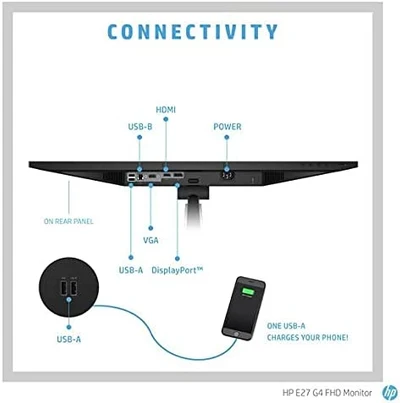
A major advantage of the HP E27q G4 is its range of connection options. The monitor includes VGA, HDMI 1.4 and DisplayPort 1.2, allowing users to connect different generations of computers and devices.
This connectivity is particularly useful for businesses that operate a mixture of newer and older computer equipment.
The HDMI 1.4 port provides digital connectivity for compatible laptops, desktops and other multimedia devices. HDMI is widely used and makes it easy to connect modern computers.
The DisplayPort 1.2 connection provides another digital display option and is particularly useful in professional workstation environments.
The inclusion of VGA is also beneficial for organizations that still have older computers or equipment using legacy analogue video connections.
The HP E27q G4 includes four USB-A 3.2 Gen 1 ports, providing convenient access to USB peripherals.
These ports can be used to connect devices such as:
Having USB ports directly on the monitor can help improve workstation organization. Instead of reaching behind a desktop computer or laptop to connect a USB accessory, users can access the ports from a more convenient location.
This can be particularly useful for professionals who frequently connect and disconnect USB devices.
The monitor also features a USB Type-B upstream port, which is used to establish the USB connection between the monitor’s integrated USB hub and the host computer.
Once the appropriate upstream connection has been established, the monitor’s USB-A ports can function as a convenient hub for compatible peripherals.
This setup helps reduce the number of connections required directly on the computer and can contribute to better cable management.
The combination of display and USB connectivity makes the HP E27q G4 particularly suitable for professional workstations.
A user can connect a computer through DisplayPort or HDMI, connect the monitor’s USB upstream cable to the computer and then use the monitor’s USB ports for peripherals.
This can create a cleaner desk environment while providing convenient access to commonly used accessories.
For businesses deploying standardized workstations, the monitor’s connectivity options can also make it easier to accommodate different computer configurations.
The HP E27q G4 is designed with productivity in mind. Its QHD resolution and 27-inch screen provide a useful working environment for a wide range of office applications.
It can be used for:
The additional screen space can be particularly helpful for users who need to view several windows simultaneously.
Software developers and IT professionals can also benefit from the HP E27q G4’s QHD resolution.
Programming often involves working with source code, development tools, documentation, terminals and web browsers. A higher-resolution display can allow more information to fit on screen while maintaining readable text.
An IT administrator can use the monitor to manage dashboards, system management applications, remote sessions and documentation.
The 27-inch QHD combination provides a good balance between physical screen size and pixel density for these types of applications.
Educational institutions can use the HP E27q G4 for computer laboratories, administration offices, staff workstations and digital learning environments.
Teachers and administrative staff can benefit from the additional screen space when working with student records, learning management systems, documents and educational software.
In computer labs, the monitor’s multiple display connections and USB ports provide flexibility for connecting different computer systems and peripherals.
Its professional design also makes it suitable for institutional workspaces.
The HP E27q G4 is not limited to corporate environments. It can also be an excellent option for home-office users who need a larger and sharper display for remote work.
A 27-inch QHD monitor provides plenty of space for video conferencing, documents, email, spreadsheets and browser windows.
Remote workers can connect a laptop or desktop computer and use the monitor as their primary workstation display.
The USB hub can also provide convenient access to keyboards, mice and other accessories.
One of the key benefits of moving from a smaller Full HD display to a 27-inch QHD monitor is improved multitasking.
The 2560 × 1440 resolution gives users additional desktop space, allowing more content to be displayed at the same time.
For example, a user can place a spreadsheet on one side of the screen and a browser window on the other. A writer can keep research material visible while working on a document. A project manager can monitor a project management application while keeping communication tools accessible.
This can reduce the need to constantly minimize and maximize applications.
The combination of VGA, HDMI and DisplayPort makes the HP E27q G4 versatile for organizations with different generations of computing equipment.
Newer computers can take advantage of DisplayPort or HDMI, while older equipment can potentially connect through VGA.
This flexibility can be valuable for businesses upgrading their systems gradually rather than replacing every computer at the same time.
It also makes the monitor useful as a replacement display for an existing workstation.
The HP E27q G4 has a professional appearance suitable for modern business environments. Its 27-inch screen provides a substantial display area without requiring the physical space of an extremely large monitor.
The monitor can fit comfortably into many standard office desks and professional workstations.
Its design is appropriate for corporate offices, educational institutions, reception areas, administrative departments and home-office setups.
The HP E27q G4 is designed to support users who spend significant amounts of time working at a computer.
Its QHD resolution provides detailed visuals, while the IPS panel supports wide viewing angles and consistent image presentation.
The combination of multiple display inputs and USB connectivity makes the monitor flexible enough to support different workstation configurations.
For businesses, having reliable displays can contribute to a more comfortable and productive computing environment.
The HP E27q G4 VG82AS provides a strong combination of screen size, resolution, display technology and connectivity.
Its 27-inch QHD IPS panel provides a large and detailed workspace suitable for professional applications. The 2560 × 1440 resolution provides more desktop space than Full HD, while the 60Hz refresh rate and 5ms response time provide suitable performance for everyday office and multimedia tasks.
The inclusion of VGA, HDMI 1.4 and DisplayPort 1.2 provides flexibility when connecting different computers. Meanwhile, four USB-A 3.2 Gen 1 ports provide convenient access to peripherals.
This makes the monitor a versatile choice for businesses, professionals, educators, IT users and home-office workers.
The HP E27q G4 27-inch QHD IPS Monitor VG82AS is a professional display designed to improve productivity through a combination of a large 27-inch screen, high QHD resolution, IPS panel technology and versatile connectivity.
Its 2560 × 1440 resolution provides sharp and detailed images, making it suitable for spreadsheets, documents, presentations, programming, data analysis and other professional applications. The IPS panel provides wide viewing angles and good image consistency, while the 60Hz refresh rate and 5ms response time offer suitable performance for everyday business and multimedia use.
With VGA, HDMI 1.4 and DisplayPort 1.2, the monitor can accommodate a variety of computer systems, while its four USB-A 3.2 Gen 1 ports and USB Type-B upstream connection add practical peripheral connectivity.
For organizations looking for a reliable professional monitor, or individuals wanting a larger and more detailed display for their home office, the HP E27q G4 provides a well-balanced combination of productivity features, connectivity and display quality.
HP Official Website:
https://www.hp.com/
Radox Technology Limited:
https://www.radox.co.ke/




Reviews
There are no reviews yet.