No products in the cart.

Only this weekend
Super Discount
Items on sale this week
Top picks this week. Up to 50% off the best selling products.
Price (Inc. Tax): KSh102,080
Model: Canon MAXIFY GX4040 EUM/EMB
Functions: Print • Scan • Copy • Fax • Cloud
Print Speed: ~18 ipm (mono); ~13 ipm (color)
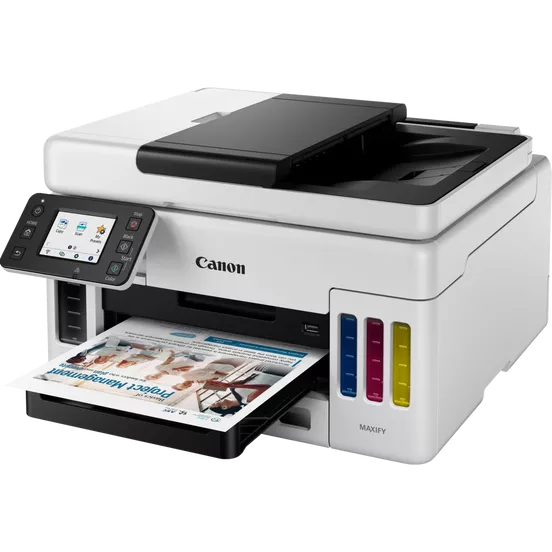
In today’s fast-paced work environments, efficiency, cost-effectiveness, and reliability are essential for maintaining productivity. Whether you’re running a small business, managing a growing home office, or supporting a hybrid work setup, the Canon MAXIFY GX4040 offers a powerful and versatile solution that fits seamlessly into modern professional life.
The Canon MAXIFY GX4040 is part of Canon’s acclaimed MAXIFY MegaTank series, known for high-volume printing with ultra-low running costs. This multifunction printer (MFP) consolidates print, scan, copy, fax, and cloud features in one compact and intelligently designed device, while offering a significantly lower total cost of ownership compared to traditional cartridge-based inkjet or laser printers.
At the core of the Canon MAXIFY GX4040 is Canon’s refillable MegaTank ink system, which drastically reduces the cost per page. It uses high-yield GI-46 ink bottles that can print up to 6,000 black pages and 14,000 color pages per full refill set. When using Economy Mode, these figures extend to 9,000 black and 21,000 color pages—ideal for businesses with heavy document output needs.
Unlike cartridge printers that require frequent and costly replacements, the Canon MAXIFY GX4040 refillable tanks are designed to be both eco-friendly and cost-efficient. Ink refilling is a mess-free experience thanks to uniquely keyed bottles that prevent errors and ensure proper alignment with the correct tank.
Speed matters when you’re working under deadlines. The Canon MAXIFY GX4040 delivers competitive performance, printing up to 18 images per minute (ipm) in monochrome and 13 ipm in color. Its first-page-out time is approximately 8 seconds for black-and-white and 9 seconds for color documents, allowing you to produce documents quickly and efficiently without waiting around.
Automatic duplex printing (double-sided printing) is built-in, helping reduce paper usage and operating costs while supporting eco-conscious business practices. Whether it’s internal reports, customer invoices, or marketing material, the Canon MAXIFY GX4040 handles it all with crisp, sharp output.
Beyond printing, the Canon MAXIFY GX4040 functions as a reliable scanner and copier. It includes a flatbed scanner with an optical resolution of 1,200 × 2,400 dpi, capturing fine details from photos and documents alike. The Automatic Document Feeder (ADF) enables you to scan or copy multi-page documents efficiently, freeing you from the need to manually insert each page.
Copying is swift and flexible, offering speeds close to printing performance. With options like 2-on-1, 4-on-1, ID card copy, and zoom levels from 25% to 400%, the Canon MAXIFY GX4040 allows businesses to save paper and time while customizing their output for specific needs.
Despite the prevalence of email and messaging platforms, fax remains vital for certain industries. The Canon MAXIFY GX4040 supports Super G3 faxing with a 33.6 kbps modem, capable of storing up to 250 pages in memory. It also features 100-speed dial entries, group dialing, and error correction capabilities. Color faxing is also supported, which is uncommon at this price point, making it a versatile tool for offices with legacy communication requirements.
The Canon MAXIFY GX4040 is built for the modern, mobile-first office. It offers an impressive range of connectivity options, including:
Wi-Fi and Wi-Fi Direct – Connect multiple devices wirelessly with or without a router.
Ethernet LAN – Seamless integration into wired office networks.
USB 2.0 – For direct connection to a PC or server.
Mobile and cloud printing options abound. You can print and scan directly from your smartphone or tablet using Canon PRINT App, Apple AirPrint, Mopria, or PIXMA Cloud Link. Additionally, you can use Google Assistant or Amazon Alexa to control key printing tasks via voice commands.
With cloud integration, users can access services like Google Drive, Dropbox, and OneDrive directly from the printer’s touchscreen interface—allowing fast and secure printing or scanning to the cloud without a computer.
The Canon MAXIFY GX4040 features a 2.7-inch color LCD touchscreen, enabling easy navigation through menus, settings, and workflows. The interface is clean, responsive, and simple to use—even for users unfamiliar with multifunction devices. Quick access to frequently used features, scan-to-email, cloud storage, and copying options make it ideal for busy teams.
One of the standout aspects of the Canon MAXIFY GX4040 is its design efficiency. The unit has a compact footprint (approx. 399 × 417 × 251 mm) and operates at a low noise level (approx. 49 dB(A)), making it well-suited for quiet office environments.
It features a 250-sheet front-loading cassette and a 100-sheet rear tray, allowing for up to 350 sheets of paper to be loaded at once—reducing the need for frequent reloading. It supports a wide variety of media, including:
Plain paper
Envelopes
Glossy and matte photo paper
Labels
Business cards
Iron-on transfers
Automatic two-sided printing works on all supported media sizes (up to A4), ensuring energy savings and efficient paper handling.
The Canon MAXIFY GX4040 isn’t just for occasional use—it’s designed for consistent, high-volume workloads. Its recommended monthly print volume is between 300 to 2,500 pages, and it supports a maximum duty cycle of up to 33,000 pages per month. This ensures the printer can handle your business demands even as they grow over time.
To keep the printer running smoothly, Canon includes a user-replaceable maintenance cartridge (MC-G04), which helps extend the product’s lifespan and minimizes downtime.
To sum it up, the Canon MAXIFY GX4040 offers a compelling package for professionals who need speed, quality, and value without sacrificing features. From high-yield printing and low operational costs to integrated mobile workflows and powerful document handling, it checks all the boxes for productivity-driven environments.
Whether you’re printing hundreds of pages a week or need a multifunction device that won’t drive up operational costs, the Canon MAXIFY GX4040 brings excellent performance, flexibility, and efficiency in one well-designed machine.
Model: Canon MAXIFY GX4040 EUM/EMB
Functions: Print • Scan • Copy • Fax • Cloud
Print Resolution: Up to 600 × 1200 dpi
Print Speed: 18 ipm (mono), 13 ipm (color)
First Page Out: ~8 sec (B/W), ~9 sec (Color)
Ink Yields: 6,000 (B/W), 14,000 (Color); Economy: 9,000 (B/W), 21,000 (Color)
Scanner: Flatbed + ADF; 1200 × 2400 dpi
Copy Features: ID Copy, 2-on-1, 4-on-1, Zoom (25–400%)
Fax: Super G3, 250-page memory
Display: 2.7″ color touchscreen
Paper Input: 250-sheet front cassette + 100-sheet rear tray
Monthly Duty Cycle: Up to 33,000 pages
Connectivity: USB, Wi-Fi, Ethernet, Wi-Fi Direct
Mobile Support: Canon PRINT, AirPrint, Mopria, Alexa, Google Assistant
Dimensions: 399 × 417 × 251 mm
Weight: Approx. 9.5 kg
Model: Canon MAXIFY GX4040 EUM/EMB
Functions: Print • Scan • Copy • Fax • Cloud
Print Speed: ~18 ipm (mono); ~13 ipm (color)
First-Print Time: ~8 sec (black); ~9 sec (color)
Print Resolution: Up to 600 × 1200 dpi
Ink System: Refillable MegaTank (GI-46 series)
Black: ~6,000 pages (9,000 economy)
Color: ~14,000 pages (21,000 economy)
Scanner: Flatbed + ADF; Optical up to 1200 × 2400 dpi
Copy Functions: 2-on-1, 4-on-1, ID copy, up to 99 copies, 25–400% zoom
Fax: Super G3, 33.6 kbps; 250-page memory, color faxing
Connectivity: Wi-Fi • Wi‑Fi Direct • Ethernet • USB; Mobile apps & cloud support
Display: 2.7″ LCD touchscreen
Paper Handling: 250-sheet cassette; 100-sheet rear tray; auto duplex
Media Support: A4, Letter, Envelopes, Photo paper, labels
Noise Level: Approx. 49 dB(A)
Duty Cycle: Up to 33,000 pages/month
Dimensions: ~399 × 417 × 251 mm (retracted)
Weight: ~9.5 kg


Reviews
There are no reviews yet.