Konica Minolta Bizhub 227, 287, 367 Side Door Lock Holder – Product Description
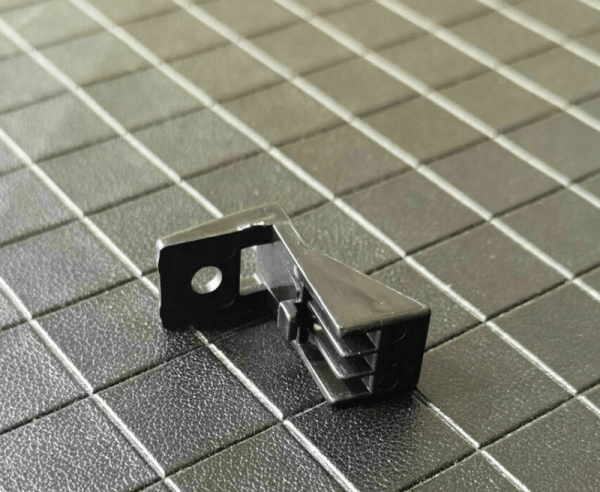
The Konica Minolta Bizhub 227, 287, 367 Side Door Lock Holder is an essential part of the Konica Minolta Bizhub series of color multifunction printers (MFPs). These models, including the Bizhub 227, Bizhub 287, and Bizhub 367, are known for their robust performance, user-friendly interface, and high-quality output in commercial and office environments. The side door lock holder is a small but vital component that plays a crucial role in the overall functionality and security of these printers.
Konica Minolta Bizhub MFPs are widely used in various office settings for printing, scanning, copying, and faxing. They are designed to handle high-volume tasks while maintaining reliability and speed. The side door lock holder is located on the side access doors of the printer, which provides entry to internal components such as toner cartridges and other maintenance areas. Its primary purpose is to hold and secure the side door lock, ensuring that the door remains safely closed during operation and preventing unauthorized access to the printer’s internal components.
When the side door lock holder is functioning correctly, it ensures that the side door remains securely shut during printing, scanning, and copying operations. This is important for preventing toner leaks, paper jams, or other issues that can arise from an open door during printing. The lock holder also helps to maintain the integrity of the internal components by preventing foreign objects or unauthorized individuals from tampering with the printer’s sensitive parts.
Importance of the Side Door Lock Holder
- Security: The side door lock holder is an integral part of the printer’s security system. It ensures that only authorized personnel can access the printer’s internal components, such as toner cartridges, imaging units, and other parts that require periodic maintenance. This reduces the risk of tampering or theft of sensitive parts, which is crucial in a shared office environment.
- Prevents Paper Jams: A properly functioning side door lock holder ensures that the side door remains securely closed during printing operations. An open or improperly closed door can cause paper jams, as the paper may not feed correctly through the printer’s internal mechanisms. This can lead to delays, wasted paper, and costly downtime.
- Maintains Print Quality: The lock holder ensures that the printer’s side access door remains closed, preventing dust, debris, or other foreign objects from entering the printer. These objects can affect the printer’s performance and print quality. For example, dust entering the toner area can result in print defects, streaks, or faded images. The lock holder keeps the door securely closed to protect the printer’s components and ensure optimal print quality.
- Durability: The side door lock holder is designed to withstand the wear and tear of daily office operations. Given that multifunction printers are often in constant use, the lock holder is built to last, providing long-term functionality and contributing to the overall durability of the printer.
How the Side Door Lock Holder Works
The side door lock holder in the Konica Minolta Bizhub 227, 287, and 367 printers is designed to securely hold the lock mechanism that keeps the side access door closed during the printer’s operation. Here’s how it works:
- Lock Mechanism: The side door of the printer is equipped with a lock and latch system. The side door lock holder holds this lock in place, ensuring that it properly engages with the door frame.
- Securing the Door: When the printer is in use, the lock mechanism keeps the side door securely shut. If the door is not properly locked, it can cause operational issues, such as paper jams or toner leakage.
- Access for Maintenance: The lock holder allows authorized users to open the side door when maintenance is needed. For example, when replacing toner cartridges or clearing paper jams, the door can be easily opened, and the lock holder ensures it stays in place once the door is closed again.
Signs the Side Door Lock Holder Needs Replacement
Over time, wear and tear can cause the side door lock holder to become damaged or worn. It’s important to monitor the functionality of the side door lock holder and replace it if necessary. Here are some signs that your side door lock holder may need replacement:
- Door Does Not Stay Closed: If the side door fails to remain securely closed during printing, it may be due to a malfunctioning or damaged lock holder. This can lead to paper jams, toner spills, or other operational issues.
- Frequent Paper Jams: If paper jams occur frequently due to the side door not being properly secured, it is a sign that the lock holder may no longer be functioning properly.
- Physical Damage: If the lock holder shows signs of physical damage, such as cracks or breakage, it should be replaced to prevent further issues.
- Difficulty Opening/Closing the Door: If the side door becomes difficult to open or close, it could be because the lock holder is misaligned or damaged, affecting the proper functioning of the lock mechanism.
Benefits of Replacing the Side Door Lock Holder
- Enhanced Printer Security: Replacing the side door lock holder ensures that the printer’s internal components are securely protected from unauthorized access or tampering. This is especially important in office environments where multiple users have access to the printer.
- Improved Print Quality: By maintaining a securely closed side door, the lock holder helps prevent dust, debris, or other contaminants from entering the printer and affecting the print quality.
- Reduced Downtime: A properly functioning side door lock holder reduces the likelihood of paper jams, toner leaks, and other operational issues that can lead to downtime. This ensures that the printer runs smoothly and efficiently.
- Cost-Effective Maintenance: Replacing a damaged or worn lock holder is a simple and cost-effective solution that can help avoid more expensive repairs or replacements in the future.
Why Choose Genuine Konica Minolta Parts?
- OEM Quality: Genuine Konica Minolta parts are specifically designed for use with Konica Minolta printers, ensuring perfect compatibility and optimal performance. These parts are built to the highest standards of quality and reliability.
- Durability: OEM parts like the Bizhub 227, 287, 367 Side Door Lock Holder are made to last, providing long-term durability and reducing the need for frequent replacements.
- Warranty and Support: Genuine Konica Minolta parts come with the manufacturer’s warranty, providing peace of mind that you are using a product that is designed to meet the high standards of the brand.
- Precision Fit: Genuine parts are engineered to fit perfectly with your printer, ensuring that the lock holder functions seamlessly within the printer’s overall mechanism.
- Reliability: By using genuine parts, you can trust that your printer will continue to deliver consistent, high-quality results without issues related to inferior or incompatible components.
Konica Minolta Bizhub 227, 287, 367 Side Door Lock Holder – Key Features
- Compatibility: Designed specifically for Konica Minolta Bizhub models 227, 287, and 367.
- Function: Secures the side door in place during printing to prevent issues such as paper jams or toner spills.
- Material: High-quality, durable materials designed to withstand repeated use.
- Installation: Easy to install with minimal downtime; usually performed during routine printer maintenance.
- Security: Prevents unauthorized access to internal components and helps maintain printer security.
Conclusion
The Konica Minolta Bizhub 227, 287, 367 Side Door Lock Holder is a vital component that ensures the proper operation of the printer, maintaining print quality and preventing paper jams. By securing the side door, it helps keep internal components protected and ensures that the printer functions without disruption. Replacing a damaged or worn lock holder is an essential part of printer maintenance and helps ensure the longevity and efficiency of your Konica Minolta Bizhub MFP.
For more information on pricing, availability, and purchasing, please visit




Reviews
There are no reviews yet.