Description
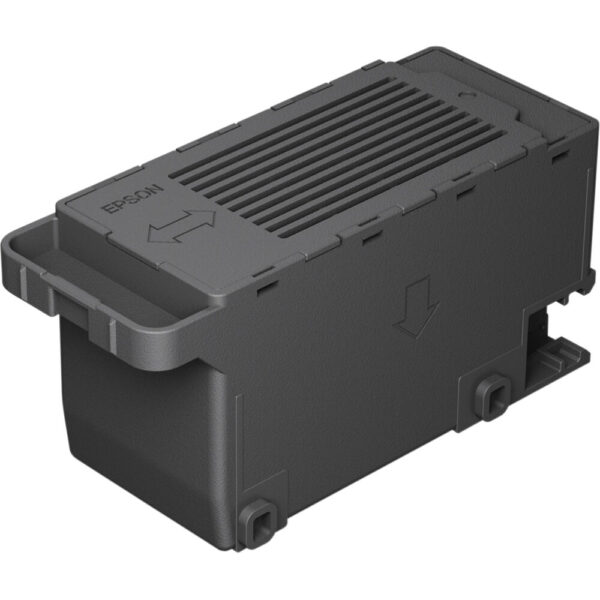
Epson Maintenance Kit-2: Comprehensive Overview
Introduction
The Epson Maintenance Kit-2 is a vital component for maintaining the performance and longevity of certain Epson printers. Designed to handle routine maintenance tasks, this kit ensures that your printer continues to operate at its best, delivering high-quality prints while minimizing potential issues. This detailed overview will cover the features, benefits, and specifications of the Epson Maintenance Kit-2, offering a thorough understanding of its role and importance.
Purpose and Benefits
The Epson Maintenance Kit-2 is engineered to address specific maintenance needs in compatible Epson printers. Regular maintenance is crucial for avoiding common printer issues such as paper jams, print quality problems, and mechanical failures. By using this maintenance kit, users can:
- Ensure Optimal Print Quality: EPSON MAINTANCE KIT-2 includes components that help keep the printer’s internal mechanisms clean and functioning correctly, ensuring that every print job meets high-quality standards.
- Extend Printer Lifespan: Regular maintenance with the Epson Maintenance Kit-2 can help prevent wear and tear on the printer’s parts, thereby extending the overall lifespan of the printer.
- Reduce Downtime: By proactively maintaining the printer, users can avoid unexpected breakdowns and minimize downtime, leading to smoother and more efficient operations.
- Enhance Printer Performance: EPSON MAINTANCE KIT-2 helps in maintaining the printer’s performance by addressing minor issues before they escalate into major problems, thus ensuring consistent performance.
Kit Components
The Epson Maintenance Kit-2 typically includes several key components necessary for the maintenance of the printer. These components might include:
- Waste Ink Pad: This part collects excess ink that is expelled during the cleaning and printing processes. Replacing the waste ink pad is essential to prevent ink overflow and potential damage to the printer.
- Ink Collection Tank: This component works in conjunction with the waste ink pad to collect and store ink that is not used in the printing process.
- Cleaning Rollers: These rollers help keep the printer’s paper feed system clean and free from debris, which is essential for preventing paper jams and ensuring smooth paper handling.
- Maintenance Manual: Some kits include a manual or guide to assist users in the proper installation and maintenance procedures.
Installation and Usage
Installing the Epson Maintenance Kit-2 is a straightforward process, but it requires careful handling and adherence to the instructions provided in the kit. Here’s a general outline of the installation process:
- Preparation: EPSON MAINTANCE KIT-2 Ensure that the printer is turned off and unplugged from the power source before beginning any maintenance work.
- Access the Maintenance Area: Open the EPSON MAINTANCE KIT-2 or service panel to access the components that need to be replaced.
- Remove Old Components: Carefully remove the old waste ink pad, cleaning rollers, or other components that are being replaced. Dispose of them according to local regulations.
- Install New Components: Place the new components from the maintenance kit into their respective slots. Ensure that each component is properly aligned and securely installed.
- Close the Printer: Once all components are installed, close the printer’s maintenance panel and plug the printer back into the power source.
- Perform a Test Print: After installation, perform a test print to ensure that the printer is functioning correctly and that the maintenance has been successful.
Maintenance Schedule
The frequency of maintenance tasks can vary depending on the printer model and usage. It is essential to follow the manufacturer’s recommendations for maintenance intervals. Typically, the printer will notify users when the maintenance kit needs to be replaced or when it is time for routine maintenance.
Compatibility
The Epson Maintenance Kit-2 is designed for specific Epson printer models. Users should verify compatibility with their printer model before purchasing the kit. Using the correct maintenance kit ensures that all components fit properly and function as intended.
Product Specifications
Here are the key specifications for the Epson Maintenance Kit-2:
- Model: Epson Maintenance Kit-2
- Type: Maintenance Kit
- Function: Waste Ink Collection and Printer Maintenance
- Compatibility: Compatible with specific Epson printer models (check printer model compatibility before purchase)
- Components Included:
- Waste Ink Pad
- Ink Collection Tank
- Cleaning Rollers
- Maintenance Manual (if applicable)
Conclusion
The Epson Maintenance Kit-2 plays a crucial role in maintaining the performance and longevity of Epson printers. By ensuring regular maintenance, users can achieve optimal print quality, extend the printer’s lifespan, reduce downtime, and enhance overall performance. Proper installation and usage of the maintenance kit are essential for reaping these benefits. Users should always ensure compatibility with their specific printer model and follow manufacturer guidelines for maintenance schedules. Investing in the Epson Maintenance Kit-2 is a proactive approach to printer care, ensuring reliable and high-quality printing experiences.




Reviews
There are no reviews yet.