No products in the cart.

Only this weekend
Super Discount
Items on sale this week
Top picks this week. Up to 50% off the best selling products.
Price (Inc. Tax): KSh129,920
Model: Canon MAXIFY GX6040 (IJ MFP GX6040 EUM/EMB)
Functions: Print / Copy / Scan
Print Speeds: Mono ~24 ipm; Color ~15.5 ipm
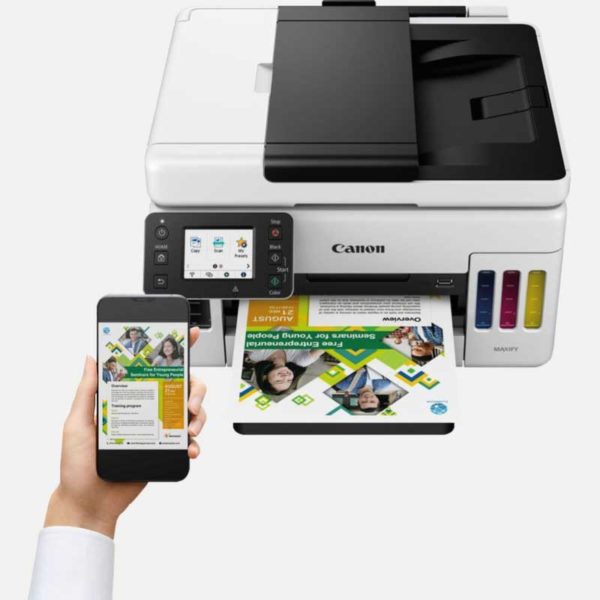
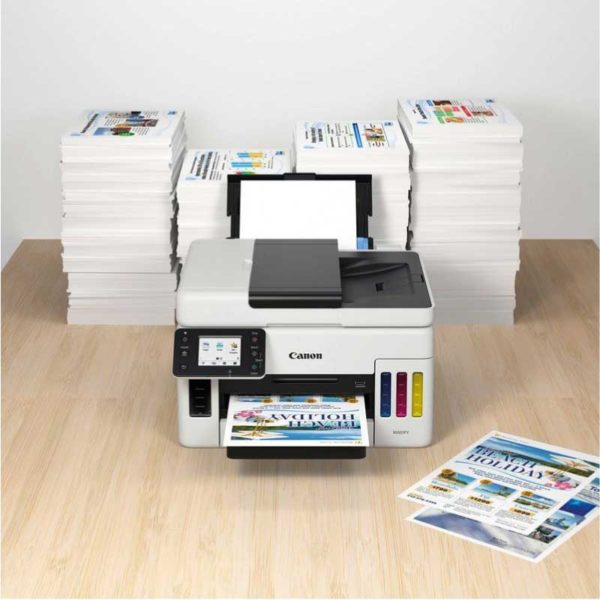
The Canon MAXIFY GX6040 is a well-rounded, carefully crafted multifunction printer designed to reduce your operating costs and enhance office productivity. Built for small to medium-sized environments, it brings together fast print, scan, and copy performance with ultra-low running costs thanks to its MegaTank refillable ink system. Whether producing text-heavy reports, client correspondence, or internal documents, this MFP offers everyday reliability in a compact, value-driven package—a smart investment for any busy workspace.
In offices where print volume runs high and budgets run low, the Canon MAXIFY GX6040 shines as a true workhorse. Its MegaTank ink system isn’t just a feature—it’s the foundation of its cost-efficient promise. A single set of color ink bottles achieves up to 14,000 printed pages, while black tank performance reaches 6,000 pages, with “Economy mode” pushing that closer to 21,000 color and 9,000 black pages. That’s a dramatic reduction in per‑page cost and fewer interruptions due to fewer replacements.
Beyond economical ink yields, the Canon MAXIFY GX6040 doesn’t skimp on speed. You’ll get a healthy 24 images per minute when printing in black-and-white and 15.5 ipm in color. The first page out arrives in about 7 seconds for mono and 8 seconds for color—fast enough to keep up with urgent office demands. Print resolution maxes out at 600 × 1,200 dpi, ensuring business documents look crisp and professional, whether they’re text-heavy invoices or customer-facing correspondence.
But it doesn’t stop at printing. The Canon MAXIFY GX6040 integrates a CIS flatbed scanner and a single-pass duplex ADF (50-sheet capacity). Scans come through at 22.2 ipm for mono and 16.9 ipm for color, maintaining a smooth workflow for document archiving or digital conversion. Copying pace is equally reliable—12.7 ipm in color and 22.2 ipm in mono (via ADF)—with the first copy produced in approximately 12 seconds. Functions like 2-on-1, 4-on-1, ID copy, frame erase, and zoom (25–400%) add flexible control.
Workflow adaptability extends further with auto‑duplex capabilities for print, scan, and copy—saving paper and time. The Canon MAXIFY GX6040 handles up to 250 sheets in its cassette, plus a 100-sheet rear tray, and supports additional optional trays. Banner printing up to 1.2 metres is also supported—an unusual but practical feature for promotional materials.
Connectivity is broad: USB 2.0, Ethernet, dual‑band Wi-Fi (2.4 / 5 GHz), and Wi‑Fi Direct. Cloud and mobile workflows are seamless with support for the Canon PRINT Inkjet app, PIXMA Cloud Link, Apple AirPrint, Mopria, as well as compatibility with Amazon Alexa™ and Google Assistant™. Navigating settings is intuitive on the 6.9 cm color touchscreen, which is tiltable for convenience—set menus, access cloud services, or check ink levels with ease.
Maintenance is simple, too. Use the user-replaceable MC-G01 maintenance cartridge to reduce downtime. The device handles up to 45,000 pages per month, making it tough enough for bustling work environments. Despite its heavy-duty potential, it remains compact (399 × 410 × 254 mm) and light (approximately 11.6 kg), with noise levels around 49 dB(A)—quiet enough to fit well in shared offices.
Real-world feedback reveals both strengths and practical limitations. Users on forums highlight the Canon MAXIFY GX6040 affordability and efficiency, while also noting that its pigment-based inks may not match dye-based printers in photo quality—especially for borderless printing or detailed imaging. A few mention a need to run regular print jobs to avoid ink clogging during inactivity. But overall, for most text, graphic, and business document use cases, the Canon MAXIFY GX6040remains a cost-saving, versatile solution.
Model: Canon MAXIFY GX6040 (IJ MFP GX6040 EUM/EMB)
Functions: Print / Copy / Scan (with duplex ADF)
Print Speed: ~24 ipm (black), ~15.5 ipm (color)
First-Print Time: ~7 sec (black), ~8 sec (color)
Print Resolution: Up to 600 × 1,200 dpi
Ink Yield: Black ~6,000 pages (9,000 economy); Color ~14,000 pages (21,000 economy)
Scanner: Flatbed + 50-sheet ADF; Speed: ~22.2 ipm (mono), ~16.9 ipm (color); Optical: 1,200 dpi
Copy Speed: ~22.2 ipm (mono); ~12.7 ipm (color via ADF); First copy ~12 sec
Copy Features: 2-on-1, 4-on-1, ID copy, frame erase, collate, zoom 25–400%
Duplexing: Automatic across print/scan/copy
Paper Capacity: 250-sheet cassette; 100-sheet rear tray; optional tray support
Banner Support: Up to 1.2 m
Connectivity: USB 2.0, Ethernet, Wi‑Fi (2.4/5 GHz), Wi‑Fi Direct
Mobile/Cloud: Canon PRINT, PIXMA Cloud Link, AirPrint, Mopria, Alexa, Google Assistant
Display: 6.9 cm (2.7″) tiltable touchscreen, multiple languages
Maintenance: User‑replaceable maintenance cartridge (MC‑G01)
Duty Cycle: Up to 45,000 pages/month
Dimensions: ~399 × 410 × 254 mm
Weight: ~11.6 kg
Noise: ~49 dB(A)
If you’d like, I can help with comparisons against similar models, local pricing in Nairobi, or availability through Radox Technology Limited.
Internal Links (at the end only):
Model: Canon MAXIFY GX6040 (IJ MFP GX6040 EUM/EMB)
Functions: Print / Copy / Scan
Print Speeds: Mono ~24 ipm; Color ~15.5 ipm
First-Print Time: Mono ~7 seconds; Color ~8 seconds
Print Resolution: Up to 600 × 1,200 dpi
Scanner: Flatbed + 50-sheet ADF; Speed: Mono ~22.2 ipm; Color ~16.9 ipm; Resolution: 1,200 × 1,200 dpi
Copy Speed: Mono ~22.2 ipm; Color ~12 ipm; First copy ~12 seconds
Duplex: Automatic for all functions
Paper Handling: 250-sheet cassette; expandable up to ~850 sheets total with optional trays
Connectivity: USB 2.0, Ethernet, Wi-Fi (2.4/5 GHz), Wi-Fi Direct
Mobile/Cloud Support: Canon PRINT Inkjet app, PIXMA Cloud Link, AirPrint, Mopria, Google Assistant, Alexa
Display: 2.7″ color touchscreen
Ink Yield: Mono ~6,000 pages; Color ~14,000 pages per set; higher in economy mode
Monthly Duty Cycle: Up to ~45,000 pages
Noise Level: ~49 dB (A)
Dimensions (W × D × H): ~399 × 410 × 254 mm
Weight: ~11.6 kg


Reviews
There are no reviews yet.