HP LaserJet Pro M227 MFP Printer Pressure Roller – Product Description
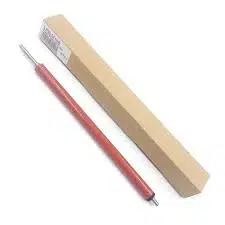
The HP LaserJet Pro M227 MFP Printer is a highly versatile and reliable multi-functional printer designed for small to medium-sized businesses and home offices. Its compact design, fast printing speeds, and exceptional print quality make it a popular choice among professionals who need an efficient, all-in-one solution for their printing, copying, and scanning needs. As with any laser printer, maintaining the printer’s internal components is crucial to ensuring that it continues to perform at its best, and one such component is the HP LaserJet Pro M227 MFP Printer Pressure Roller.
The pressure roller is a critical component in the fusing system of any laser printer. The role of the pressure roller is to apply pressure to the toner as it passes through the fuser unit, helping to bond the toner particles securely to the paper. This ensures high-quality, sharp prints with no smudging or fading. Over time, the pressure roller can become worn or damaged due to frequent use, leading to a decline in print quality. When this happens, prints may become blurry, uneven, or smudged, and paper jams or misfeeds may occur.
Replacing the HP LaserJet Pro M227 MFP Printer Pressure Roller is essential for maintaining the quality and efficiency of your printer. This simple but important maintenance task ensures that your printer continues to produce clear, crisp text and images, with proper toner adhesion, preventing print defects and ensuring smooth paper handling.
In this product description, we will delve deeper into the role of the pressure roller, how to identify when it needs to be replaced, and why it’s important to use original HP replacement parts. Additionally, we will explore the advantages of maintaining the HP LaserJet Pro M227 MFP Printer with regular service and care, ensuring you get the best value from your device.
How the HP LaserJet Pro M227 MFP Printer Pressure Roller Works
The fusing system in a laser printer consists of the fuser and the pressure roller. The fuser applies heat to the toner on the paper to melt and permanently bond the toner to the paper fibers. The pressure roller works in tandem with the fuser by applying consistent pressure to the paper and toner. This is crucial because, without the right amount of pressure, the toner may not fully adhere to the paper, resulting in poor-quality prints.
When the printer processes a document, the toner is first transferred to the paper from the toner cartridge. The paper then moves through the fuser assembly, where the toner is heated and pressed onto the paper. The pressure roller provides the necessary pressure to make sure the toner stays securely bonded to the paper, ensuring a crisp and sharp output. Without a fully functioning pressure roller, the printer cannot perform at its peak, leading to print quality issues like smudging, fading, or incomplete toner application.
Signs that the Pressure Roller Needs Replacement
Like any other part of the printer, the HP LaserJet Pro M227 MFP Printer Pressure Roller wears out over time. This wear can lead to various printing issues that may affect your daily workflow. Common signs that the pressure roller needs replacing include:
- Smudged or Faded Prints: If prints begin to show smudges, streaks, or fading, it could indicate that the toner is not being properly fused to the paper due to inadequate pressure from the roller.
- Uneven Print Quality: If you notice that the print is blotchy or inconsistent, it could be due to the pressure roller not applying enough pressure across the paper surface.
- Paper Jams or Misfeeds: If the printer begins to experience frequent paper jams or misfeeds, it might be a sign that the pressure roller is causing issues with the paper handling. This can result in the paper not moving smoothly through the printer.
- Ghosting: If faint copies of images or text appear on your printed pages, this is another sign of a worn-out pressure roller.
- Toner Marks: Toner marks or lines across the printed page can be caused by a misaligned or worn pressure roller that is not pressing the paper properly.
Advantages of Replacing the Pressure Roller
Replacing a worn-out HP LaserJet Pro M227 MFP Printer Pressure Roller can have a significant positive impact on the printer’s overall performance. Some of the key benefits include:
- Restores Print Quality: Installing a new pressure roller ensures that the toner is applied correctly to the paper, resulting in clear, sharp prints.
- Prevents Smudging and Fading: A properly functioning pressure roller prevents toner from smearing or fading, improving the quality of your printed documents.
- Reduces Paper Jams: By ensuring proper paper handling and smoother movement through the printer, replacing the pressure roller can reduce the risk of paper jams and misfeeds.
- Increases Printer Longevity: Regular maintenance, including replacing the pressure roller, helps extend the life of your printer by preventing further damage to other components.
- Cost-Effective: Replacing the pressure roller is a relatively low-cost maintenance task compared to major repairs, helping to avoid more expensive service calls or part replacements.
Why Use Original HP Parts?
When replacing components like the HP LaserJet Pro M227 MFP Printer Pressure Roller, it is essential to use original HP replacement parts. Here’s why:
- Compatibility: Original HP parts are designed specifically for your printer model, ensuring perfect fit and seamless performance.
- Quality Assurance: HP’s parts are manufactured to the highest standards, ensuring long-lasting durability and optimal performance.
- Warranty: Using original parts preserves your printer’s warranty and ensures that your device remains covered by HP’s support services.
- Performance: Original HP components, like the pressure roller, are designed to work in harmony with other printer components, ensuring consistent quality and reliability.
HP LaserJet Pro M227 MFP Printer Pressure Roller – Key Features
- Function: Applies pressure to toner during the fusing process to ensure toner is permanently bonded to the paper.
- Durability: Designed for long-term use, the pressure roller is built to last and perform reliably under regular office or home use.
- High-Quality Prints: Replacing the pressure roller helps maintain high print quality with sharp, smudge-free results.
- Reduced Paper Jams: Ensures smooth paper feeding through the printer, preventing common paper handling issues.
- OEM Quality: As an original HP replacement part, the pressure roller guarantees the best performance and compatibility with your printer.
- Cost-Effective: Replacing the pressure roller is an affordable way to restore printer performance without needing to replace expensive parts.
- Easy Installation: The pressure roller is easy to install, with straightforward instructions available for users to perform the replacement themselves.
Conclusion
The HP LaserJet Pro M227 MFP Printer Pressure Roller is an essential component in the fusing process of your printer, ensuring the proper adhesion of toner to paper for sharp, high-quality prints. If you begin to notice issues like faded prints, paper jams, or smudging, it may be time to replace the pressure roller. Using an original HP replacement part guarantees optimal performance, compatibility, and reliability for your printer.
For further information or to purchase the HP LaserJet Pro M227 MFP Printer Pressure Roller, visit
Regular maintenance and replacement of worn components like the pressure roller can extend the life of your printer and ensure smooth, trouble-free operation.



Reviews
There are no reviews yet.